Home Blog Page 115

Spotify Wrapped 2025 adds its first multiplayer feature with ‘Wrapped Party’

0


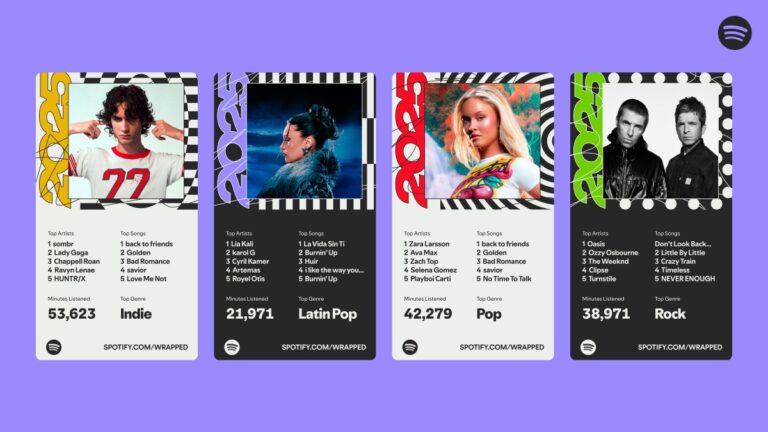
Spotify Wrapped is back. After last year’s widely criticized flop that included an AI podcast as its highlight, the streamer’s highly anticipated annual review feature has returned to its roots. This year, Spotify is doubling down on what it knows works best: deep dives into your streaming data, creative experiences, messages from favorite artists, and other social features.

The company claims that Wrapped 2025 is its biggest, as it’s introducing nearly a dozen new features in addition to its old standbys, like top songs and artists. Plus, it’s offering more visibility into users’ data than in years past. For the first time, Spotify Wrapped is adding a live multiplayer feature to compare your listening data with friends.

Wrapped Party, Wrapped’s first live interactive experience, allows you to invite up to nine friends to compare listening stats.

Image Credits:Spotify

Also new this year, your Top Songs Playlist will include the play counts for each of the top songs, so you can actually see how much time you spent with your favorite tracks.

Other standout features this year include an interactive Top Song Quiz, a Listening Age feature, and Wrapped Clubs, which match you to one of six unique listening styles.

The company believes these additions will not only bring back the personalized, engaging experience that users have long expected from Wrapped, but will take it a step further by making it more interactive than before.

In the Top Song Quiz, for instance, you can try to guess which top song soundtracked your year before seeing the results.

Techcrunch event

San Francisco
|
October 13-15, 2026

Image Credits:Spotify

The new interactive Wrapped Party feature isn’t just about comparing the personal streaming data you’ve already received to your friends’ data, as that’s something people already do on social media. Instead, the feature presents unique data stories for your group, like who’s the “most obsessed fan,” the “early bird,” the most “picky listener,” or even something as nice as the “dinner table explainer,” meaning the person who listens to the most news podcasts.

Image Credits:Spotify

Spotify says these awards update dynamically every time you join a Wrapped Party, so no two sessions are ever the same — even if you run through them again with the same group of friends.

The new Wrapped Clubs, meanwhile, will group you into one of half a dozen listening styles, like the “Soft Hearts Club,” the “Club Serotonin,” the “Full Charge Crew,” the “Cosmic Stereo Club,” and others. You’ll also receive a role in the club based on your listening data. You might be a club leader if your listening choices strongly matches the club’s values, a scout if you’re always seeking out new releases, or an archivist if you listen to music from past eras.

Image Credits:Spotify

Another feature, Listening Age, compares your 2025 music listening to others in your age group. To calculate your age, the feature considers the release years of the tracks you listen to most. From there, it identifies the five-year span of music that you engaged with more than other listeners your age.

Image Credits:Spotify

As in prior years, you’ll see your top songs, top artists, top genres, and, for the first time, top albums. If you engaged with audiobooks and podcasts, you’ll see metrics for those as well. Artists, writers, and podcasters will have their own version of Wrapped as before. And top fans will again receive video messages from their favorite artists, podcasters, and, now, authors.

You’ll also receive a playlist of your top songs of the year, as before.

Image Credits:Spotify

What you won’t find in this year’s Wrapped is any feature that advertises it was made with AI.

In a press briefing on Tuesday, Spotify’s Senior Director of Global Marketing, Matt Luhks, admitted the company received a “lot of feedback” about its 2024 AI-focused Wrapped experience, saying it was a “mix of positive and ‘more constructive feedback,’” despite the feature driving more engagement than prior years.

“We take all of that in. We use that as information, insights, [and] inspiration for how we approached Wrapped this year,” he said in a press event ahead of today’s launch.

“What our users tell us about Wrapped means a lot to us, so it was really informative in how we approached Wrapped this year. And what we tried to build was the most creative, most innovative, most engaging Wrapped ever,” he added, setting a high bar for the 2025 edition of the now 11-year-old annual year-in-review feature.

“We’re the original and, we believe, still the best,” Luhks said.

Image Credits:Spotify

Still, AI was a part of the Wrapped experience. Though the company claims the overall experience was not made with AI, it does leverage a LLM (large language model) to add a storytelling layer to Wrapped’s facts and figures, and natural language summaries in other parts of its experience, looking back on your data.

Spotify’s attempt to fix Wrapped after a notable stumble comes as the streamer faces increased competition from Apple, Amazon, YouTube, and others, which have all launched their own annual review features, inspired by Wrapped.

“Everyone seems to have their own version of Wrapped. Now, there’s a lot of reviews and replays and rewinds out there, but we believe that Wrapped still sets the bar for these year-end recaps,” Luhks said.

Along with the consumer experience, Spotify shared its top artists, songs, albums, podcasts, and audiobooks for the year, with top winners that included, respectively, Bad Bunny (top song and album), Joe Rogan (“The Joe Rogan Experience” podcast), and Rebeca Yarros (author of “Fourth Wing”).


Source link

How to use Magnifier on a MacBook to zoom in on faraway text

0


One of the iPhone’s many accessibility features is something Apple calls “Magnifier,” which uses the smartphone’s cameras to magnify and identify objects in the world around you. For Global Accessibility Awareness Day in May this year, Apple brought Magnifier to the Mac, opening up even more places the assistive tool can be used, like classroom or work environments where you might already have a MacBook pulled out.

Magnifier requires macOS 26 Tahoe and can work with a built-in webcam, a connected third-party camera or an iPhone via Apple’s Continuity feature. Provided your MacBook can run Apple’s latest software update, it’s a natural fit for zooming in on a whiteboard at the back of a large lecture hall or getting a closer look at documents on a desk in front of you. You can use the app to both capture an individual image you want to refer to later, or to analyze text in a live video feed. But where to begin? Here’s how to set up and use Magnifier on your Mac.

How to use Magnifier to identify and display text

A MacBook using Magnifier and a connected iPhone to identify and format text from a book.

A MacBook using Magnifier and a connected iPhone to identify and format text from a book. (Apple)

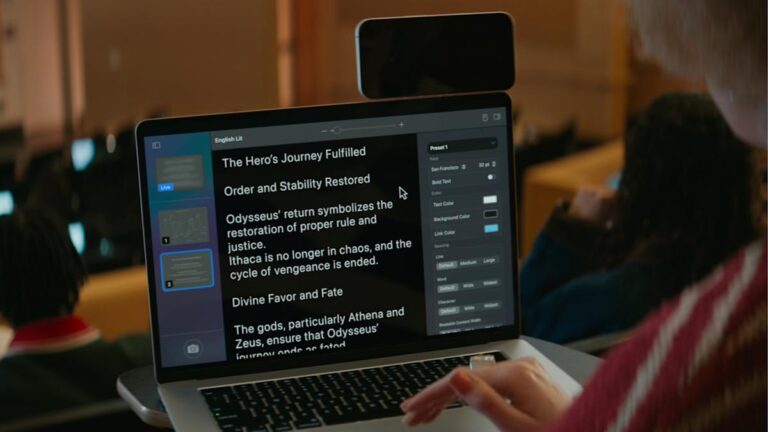
Magnifier’s most powerful feature uses the MacBook’s machine learning capabilities to identify, display and format text that your camera captures. This works with text your camera can see in the room around you, and things it captures via macOS’ Desk View feature. For example, to view documents on your desk:

  1. Click on the Camera section in Magnifier’s menu bar and then select your Desk View camera from the dropdown menu.

  2. Click on the Reader icon (a simple illustration of a document) near the top-right of your Magnifier window.

  3. Click on the sidebar menu icon to access settings to format text.

Apple gives you options to change the color, font and background of text Magnifier identifies, among other customization options. If you’d prefer to capture faraway text, you can position a webcam or iPhone camera facing away from you and swap to it via the Camera section in Magnifier’s menu bar.

You can also listen to any text Magnifier has identified by clicking on the Play button in the top-right corner of Magnifier’s reader mode. Clicking the Pause button will pause playback, clicking the Skip Forward or Skip Backward buttons skip through lines of text, and if you want to adjust playback speed, you can click on the 1x button and pick a speed from the dropdown menu.

How to use Magnifier to zoom in on yourself

A screenshot of the macOS Magnifier app zoomed in on a face.

Magnifier can identify text, but it also works as a way to get a zoomed in view of your own face. (Ian Carlos Campbell for Engadget)

By default, Magnifier uses your MacBook’s built-in webcam, which means you’ll see a view of yourself and whatever’s behind you if you don’t have another camera selected. This might not be usual for seeing faraway text, but it is handy if you’re applying makeup, putting in contacts or doing anything else where you need a detailed view of your face.

In my tests, using Magnifier worked the best with my MacBook’s built-in webcam or an iPhone. When I tried using a third-party webcam from Logitech, my live camera feed was noticeably laggy. Your mileage may vary, but if you experience any issues with your own webcam, it’s worth trying your built-in webcam to see if that helps. You can swap between cameras and zoom in to your camera feed inside the Magnifier app:

  1. In the top menu bar, select Camera and then click on the camera you’d like to use in the dropdown menu.

  2. Use the slider in the top center of the Magnifier window to zoom in on yourself.

You can see a live feed of your zoomed in view in Magnifier’s main window. If you click on the Camera button in the bottom-left corner of the app, you can also snap a photo to review later. Any photos you capture will appear in Magnifier’s left sidebar menu. Clicking on them lets you view them, zoom in on them and adjust their visual appearance (Brightness, Contrast and other visual settings) via the Image section in Magnifier’s menu bar.


Source link

Nothing Phone (3a) and Phone (3a) Pro get their Android 16 update

0


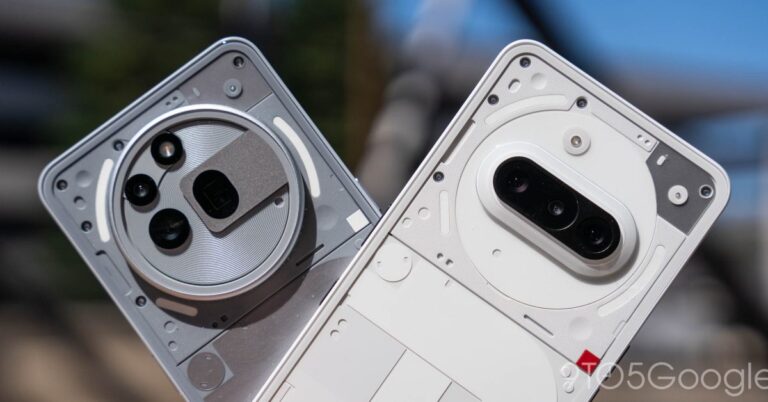
Not too long after landing on the Nothing Phone (3), Android 16 (Nothing OS 4.0) is now rolling out to the Nothing Phone (3a) series.

As detailed in a post on its forums, Nothing is now rolling out Nothing OS 4.0, based on Android 16, to Phone (3a) and Phone (3a) Pro. Like the same update on Phone (3), this includes new features such as the AI usage dashboard, hiding apps, updated widget options, and upgrades to Essential Space.

The changelog for Nothing OS 4.0 for Phone (3a) series is as follows:

New Features

  • Added AI usage dashboard. When using Essential Space, it automatically tracks AI large model usage for enhanced privacy transparency. Path: Settings > Intelligence toolkit > AI usage.
  • Hiding apps directly from the home screen and App drawer is now supported. Find hidden apps via: Home screen > App drawer > Hidden icons.
  • Managing the search scope is now supported in App drawer to display results within a specific scope.
  • Added more size options for Weather, Pedometer, Screen Time widgets.
  • 2×2 size is now supported for most QuickSettings tiles.
  • Pop-up view now supports two floating icons for easier switching.
  • System upgrade supports app optimisation to improve startup speed. Path: Settings > Apps > App optimisation.

Essential Innovations

  • Flip to Record now lets you take photos and add notes while recording, all stored together for easy access in Essential Space.
  • Introducing Playground (Alpha) — come to experience unique creations from the Community, including Essential Apps, Camera Presets, and EQ Profiles.
  • Essential Apps (Alpha) are now open for download. Enjoy the AI-powered, community-crafted apps that blend creativity with efficiency.

Visual Enhancements

  • Nothing app icons have been redesigned with an all-new, fresh look.
  • Updated status bar icons with a more intuitive look.
  • Added 2 new lock screen clock faces in Customisation.
  • Extra dark mode is now available, bringing a more immersive dark style. Path: Settings > Display > Dark theme > Extra dark mode.
  • Improved transition animations in certain scenarios for a smoother, more fluid experience.

Glyph Interface

  • Added a setting to choose whether Flip to Glyph switches your phone to Silent or Vibrate mode.
  • Glyph Progress now uses Android 16 Live Update notifications for improved compatibility with third-party apps.

Camera Enhancements

  • Presets: Updated default list with new popular styles.
  • Filters: Added intensity adjustment and exclusive ‘Stretch’ styles.
  • Motion Photos: Supports longer recording times and audio capture.
  • Watermarks: Introduced new Nothing brand watermarks and artistic frames.
  • Interface: Refreshed camera UI design with optimised interactions.

The update is rolling out now to all users. The rollout started on November 28, so it should be widely available at this point.

Advertisement – scroll for more content

More on Nothing:

Follow Ben: Twitter/XThreads, Bluesky, and Instagram

FTC: We use income earning auto affiliate links. More.


Source link

Mega Millions numbers: Are you the lucky winner of Tuesday’s $90 million jackpot? One ticket in New Jersey won

0


Are you tonight’s lucky winner? Grab your tickets and check your numbers. Someone in New Jersey won a jackpot worth $90 million in the Mega Millions lottery. The jackpot resets again for Friday night’s drawing.

Here are the winning numbers in Tuesday’s drawing:

17-25-26-53-60: Mega Ball: 16

The estimated jackpot for the drawing is $90 million. The cash option is about $41.9 million. Since there was a jackpot winner, the top prize resets to $20 million for the next drawing.

According to the game’s official website, the odds of winning the jackpot are 1 in 302,575,350.

Players pick six numbers from two separate pools of numbers — five different numbers from 1 to 70 and one number from 1 to 25 — or select Easy Pick. A player wins the jackpot by matching all six winning numbers in a drawing.

Jackpot winners may choose whether to receive 30 annual payments, each five percent higher than the last, or a lump-sum payment.

Mega Millions drawings are Tuesdays and Fridays and are offered in 45 states, Washington D.C. and the U.S. Virgin Islands. Tickets cost $5 each.

If you purchase a product or register for an account through a link on our site, we may receive compensation. By using this site, you consent to our User Agreement and agree that your clicks, interactions, and personal information may be collected, recorded, and/or stored by us and social media and other third-party partners in accordance with our Privacy Policy.


Source link

All the biggest news from AWS’ big tech show re:Invent 2025

0


Amazon Web Services’ annual tech conference AWS re:Invent has wrapped up its first official day of programming and has already delivered an endless stream of product news.

The unsurprising theme is AI for the enterprise, although this year it’s all about upgrades that give its customers greater control to customize AI agents — including one that AWS claims can learn from you and then work independently for days.

AWS re:Invent 2025, which runs through December 5, started with a keynote from AWS CEO Matt Garman, who leaned into the idea that AI agents can unlock the “true value” of AI.

“AI assistants are starting to give way to AI agents that can perform tasks and automate on your behalf,” he said during the December 2 keynote. “This is where we’re starting to see material business returns from your AI investments.”

While AI agent news promises to be a persistent presence throughout AWS re:Invent 2025, there were other announcements, too. Here is a roundup of the announcements that got our attention. TechCrunch will continue to update this article through the end of AWS re:Invent, so be sure to check back.

An AI training chip and Nvidia compatibility

AWS introduced a new version of its AI training chip called Trainium3 along with an AI system called UltraServer that runs it. The TL;DR: This upgraded chip comes with some impressive specs, including a promise of up to 4x performance gains for both AI training and inference while lowering energy use by 40%.

AWS also provided a teaser. The company already has Trainium4 in development, which will be able to work with Nvidia’s chips.

Techcrunch event

San Francisco
|
October 13-15, 2026

Expanded AgentCore capabilities

AWS announced new features in its AgentCore AI agent building platform. One feature of note is Policy in AgentCore, which gives developers the ability to more easily set boundaries for AI agents.

AWS also announced that agents will now be able to log and remember things about their users. Plus it announced that it will help its customers evaluate agents through 13 prebuilt evaluation systems.

A nonstop AI agent worker bee

AWS announced three new AI agents (there is that term again) called “Frontier agents,” including one called “Kiro autonomous agent” that writes code and is designed to learn how a team likes to work so it can operate largely on its own for hours or days.

Another of these new agents handles security processes like code reviews, and the third does DevOps tasks such as preventing incidents when pushing new code live. Preview versions of the agents are available now.

New Nova models and services

AWS is rolling out four new AI models within its Nova AI model family — three of which are text generating and one that can create text and images.

The company also announced a new service called Nova Forge that allows AWS cloud customers to access pre-trained, mid-trained, or post-trained models that they can then top off by training on their own proprietary data. AWS’s big pitch is flexibility and customization.

Lyft’s argument for AI agents

The ride-hailing company was among many AWS customers that piped up during the event to share their success stories and evidence of how products affected their business. Lyft is using Anthropic’s Claude model via Amazon Bedrock to create an AI agent that handles driver and rider questions and issues.

The company said this AI agent has reduced average resolution time by 87%. Lyft also said it has seen a 70% increase in driver usage of the AI agent this year.

An AI Factory for the private data center

Amazon also announced “AI Factories” that allow big corporations and governments to run AWS AI systems in their own data centers.

The system was designed in partnership with Nvidia and includes both Nvidia’s tech and AWS’s. While companies that use it can stock it with Nvidia GPUs, they can also opt for Amazon’s newest homegrown AI chip, the Trainium3. The system is Amazon’s way of addressing data sovereignty, or the need of governments and many companies to control their data and not share it, even to use AI.

Check out the latest reveals on everything from agentic AI and cloud infrastructure to security and much more from the flagship Amazon Web Services event in Las Vegas. This video is brought to you in partnership with AWS.


Source link

Google Discover is testing AI-generated headlines and they aren’t good

0


Artificial intelligence is showing up everywhere in Google’s services these days, whether or not people want them and sometimes in places where they really don’t make a lick of sense. The latest trial from Google appears to be giving articles the AI treatment in Google Discover. The Verge noticed that some articles were being displayed in Google Discover with AI-generated headlines different from the ones in the original posts. And to the surprise of absolutely no one, some of these headlines are misleading or flat-out wrong.

For instance, one rewritten headline claimed “Steam Machine price revealed,” but the Ars Technica article’s actual headline was “Valve’s Steam Machine looks like a console, but don’t expect it to be priced like one.” No costs have been shared yet for the hardware, either in that post or elsewhere from Valve. In our own explorations, Engadget staff also found that Discover was providing original headlines accompanied by AI-generated summaries. In both cases, the content is tagged as “Generated with AI, which can make mistakes.” But it sure would be nice if the company just didn’t use AI at all in this situation and thus avoided the mistakes entirely.

The instances The Verge found were apparently “a small UI experiment for a subset of Discover users,” Google rep Mallory Deleon told the publication. “We are testing a new design that changes the placement of existing headlines to make topic details easier to digest before they explore links from across the web.” That sounds innocuous enough, but Google has a history of hostility towards online media its frequent role as middleman between publishers and readers. Web publishers have made multiple attempts over the years to get compensation from Google for displaying portions of their content, and in at least two instances, Google has responded by cutting out those sources from search results and later claiming that showing news doesn’t do much for the bottom line of its ad business.

For those of you who do in fact want more AI in your Google Search experience, you’re in luck. AI Mode, the chatbot that’s already been called outright “theft” by the News Media Alliance, is getting an even more symbiotic integration into the mobile search platform. Google Search’s Vice President of Product Robby Stein posted yesterday on X that the company is testing having AI Mode accessible on the same screen as an AI Overview rather than the two services existing in separate tabs.


Source link

Galaxy Buds 4 can’t stop copying AirPods in latest leaks

0


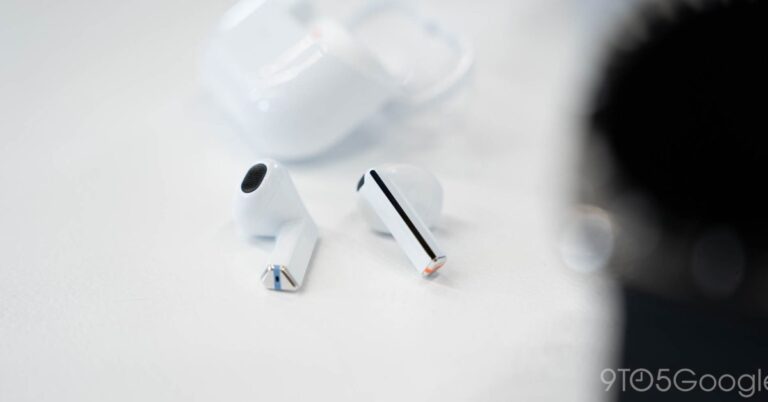
Samsung’s upcoming Galaxy Buds 4 lineup will give the “base” model a makeover too, as new leaks show off the design and uncover a new physical gesture for activating the “Interpreter” mode.

With the Galaxy Buds 3 generation, Samsung transitioned its lineup to, for lack of a better description, pretty blatantly copy Apple’s setup. The Pro model features rubber-like eartips for passive noise cancellation and a better fit, while the “base” model features an open-ear-ish design similar to Apple’s base AirPods.

The pattern will continue with the next generation.

The folks over at Android Authority uncovered new images in a leaked One UI 8.5 build that show off the base Galaxy Buds 4. Like the Pro, they have a new brushed metal design, just without the eartip found on the higher-end product. There’s no surprise here by any means.

Advertisement – scroll for more content

What is new, though, is a physical gesture being added that activates “Interpreter” mode. This is done by pinching and holding the stem of both earbuds at the same time. This means you don’t have to get out your phone to activate live translation.

Samsung explains in a code snippet:

Translate your conversation in real time when you’re wearing your Buds. Pinch and hold both Buds to get started, without getting out your phone or tablet.

It’s also another way Samsung is copying Apple. On AirPods Pro, the exact same gesture is used to launch “Live Translation,” as Apple details on a support page.

Samsung is expected to launch Galaxy Buds 4 sometime next year, likely alongside the Galaxy S26 series.

More on Samsung:

Follow Ben: Twitter/XThreads, Bluesky, and Instagram

FTC: We use income earning auto affiliate links. More.


Source link

Mass. weather: Here’s when to expect Tuesday’s snowstorm to end

0


The messy winter storm that has already dumped more than 5 inches of snow in parts of Massachusetts will continue to make its presence felt throughout the day Tuesday, but forecasters say the precipitation should wrap up by daybreak.

A ridge of high pressure is expected to build to the southwest of Massachusetts on Wednesday, bringing in sunshine and diminishing winds. Temperatures should remain below normal for early December, in the mid-30s in high terrain and high-30s to low-40s elsewhere.

And while the precipitation is expected to have wrapped up, National Weather Service forecasters did issue a Coastal Flood Statement along the eastern coast.

“Any impacts should be very minor … but with building seas offshore and a gusty wind some very minor coastal flooding/splashover will be possible during the time of high tide with the best chance south of Boston,” forecasters wrote.

But before relief arrives on Wednesday, Massachusetts will have to weather the ongoing impacts of the storm.

“An initial burst of snow through early afternoon will change to mainly rain south of I-90 by mid-to-late afternoon,” forecasters wrote. “A few inches of snow may occur in this region before the transition to rain across southwest/south central MA perhaps into far northern CT.”

“There remains some uncertainty how far north this mid-level warm layer will reach before stalling out … but we are thinking this will mainly stay south of the Route 2 corridor and possibly not make it much further north than I-90.”

Where precipitation does stay snow, 1 to 2 inches could fall per hour into the early evening, leading to a significant impact for those commuting north of the Massachusetts Turnpike, and particularly near the Route 2 Corridor.

Areas south of the Mass. Pike and along Interstate 95 should continue to see moderate to heavy rain for the late-day commute.

As temperatures cool overnight, many areas will see the precipitation transition to snow before the precipitation winds down ahead of daybreak. A coating to an inch of snow is possible on the I-95 corridor and into interior eastern Massachusetts.

Further northwest in the lower elevations of Western and Central Massachusetts, along with interior northeast Massachusetts, accumulations between 2 and 5 inches are expected. The highest snowfall amounts of 5 to 10 inches should be common in the northern Worcester Hills and Berkshires as well as areas north of Route 2.

Gusty northern winds are expected to work into the region as the system moves through Tuesday evening and overnight. Forecasters expect wind gusts of 20 to 30 mph, with some 35-40 mph gusts possible along the outer Cape and Nantucket.

“Not expecting many issues with roads along and southeast of I-95 corridor … but northwest of I-95 untreated roads will be slippery for the Wednesday [morning] commute despite the precipitation having ended,” forecasters wrote.


Source link

OpenAI slammed for app suggestions that looked like ads

0


ChatGPT’s unwelcome suggestion for a Peloton app during a conversation led to some backlash from OpenAI customers. People feared that ads had arrived, even for paid customers. OpenAI, however, clarified that the app suggestion was not an advertisement, but instead a poor attempt to integrate an app discovery feature within conversations.

In a post on X, which has since been viewed nearly 462,000 times, AI startup Hyberbolic’s co-founder, Yuchen Jin, shared a screenshot where ChatGPT seemingly suggested connecting the Peloton app in an unrelated conversation. Worse still, Jin noted he was a paid subscriber to ChatGPT’s $200 per month Pro Plan. At that price point, ads would not be expected.

The post, which was reshared and saved hundreds of times across X, received quite a bit of attention, as it seemed to indicate OpenAI was testing the insertion of ads into its paid product. Users complained that paying customers, especially, shouldn’t have to see app suggestions like this.

One person also pointed out that they couldn’t get ChatGPT to stop recommending Spotify to them, even though they were an Apple Music subscriber.

OpenAI’s data lead for ChatGPT, Daniel McAuley, later jumped into the thread to clarify that the Peloton placement was not an ad; it was “only a suggestion to install Peloton’s app.” He said there was “no financial component” to the appearance of the app suggestion.

However, he admitted that “the lack of relevancy” to the conversation made it a bad and confusing experience, and OpenAI was iterating on the suggestions and the user experience.

A company spokesperson also confirmed to TechCrunch that what users had spotted was one of the ways OpenAI had been “testing surfacing apps in ChatGPT conversations.” They pointed to OpenAI’s announcement in October about its new app platform, where the company noted that apps would “fit naturally” into user conversations.

Techcrunch event

San Francisco
|
October 13-15, 2026

“You can discover [apps] when ChatGPT suggests one at the right time, or by calling them by name. Apps respond to natural language and include interactive interfaces you can use right in the chat,” the post explained.

But that didn’t appear to be the case here, as the user claims they weren’t discussing anything related to health and fitness. Instead, as the screenshot shows, they had been chatting with the AI about a podcast featuring Elon Musk, where xAI was the topic being discussed. Inserting Peloton into this experience was unhelpful and a distraction.

Yet even if the app suggestion had been relevant, users may have still viewed it as an ad, given that it’s directing people to a product from a business that isn’t free. In addition, users can’t turn off these app suggestions, which may make them feel more intrusive.

This user sentiment could have potential ramifications for OpenAI’s desire to replace the App Store experience, and apps that run on your phone, with integrated apps that run within ChatGPT. If users don’t want to see app suggestions, they could choose to switch to a competitor’s chatbot to avoid them.

Currently, ChatGPT apps are available to logged-in users outside of the EU, Switzerland, and the U.K., and the integrations are still in pilot testing. OpenAI partners with a number of app makers, including Booking.com, Canva, Coursera, Figma, Expedia, Zillow, and others.


Source link

YouTube just introduced a yearly recap of your watched videos

0


YouTube has introduced a yearly recap to the main app for the first time ever, bringing the focus to video. This recap highlights a user’s favorite channels, topics and other fun little nuggets sourced from viewing habits throughout the year. It’s available for perusal right now for both free and premium users.

Just look for the “You” tab at the bottom of the app to get started. Alternatively, web users can head to to access the same information. This recap can be shared across social media, just like all of the other ones from platforms like Spotify and Apple Music.

A shot of the recap.

YouTube

Speaking of music, the is still going, but there’s a slight twist. Users will get shuttled to the Music app for a dedicated recap after working through the 2025 video highlight reel. This feature only triggers for users who have enjoyed the YouTube Music app for at least ten hours.

These recaps are only available for adults, which should please parents who don’t want to see an itemized list of all of the annoying loudmouths their kids watch on YouTube all day. This was the platform’s 20th year, so we recently going all the way back to 2005.


Source link