Home Blog Page 142

Amazon and Perplexity are fighting over the future of AI shopping

0


Amazon has sent a cease-and-desist letter to Perplexity that demands that the AI startup prevents its Comet browser from making purchases on Amazon, Bloomberg reports. In a blog post responding to Amazon’s letter, Perplexity claims Amazon is “bullying” the company and that its demands pose “a threat to all internet users.”

In Amazon’s eyes, Comet’s agent violates its terms of service, degrades the Amazon shopping experience and introduces privacy vulnerabilities, Bloomberg writes. Amazon’s “Conditions of Use” for Amazon.com specifically prohibit “any downloading, copying, or other use of account information for the benefit of any third party” and “any use of data mining, robots, or similar data gathering and extraction tools.” Depending on your definition, the agentic capabilities Perplexity offers through Comet could violate both clauses. The browser securely stores log-in credentials for websites locally, and uses them to make purchases for customers on Amazon with a simple command.

Perplexity and Amazon agreed to pause agentic shopping on Amazon in November 2024, according to the report, but when Comet was released, Perplexity allowed it again. By representing the Comet agent as a Chrome browser user rather than a bot, the company allegedly tried to get around the agreement, until Amazon found out and sent its cease-and-desist letter.

Amazon posted the statement below on its blog, openly acknowledging the issues it has with Perplexity:

We think it’s fairly straightforward that third-party applications that offer to make purchases on behalf of customers from other businesses should operate openly and respect service provider decisions whether or not to participate. This helps ensure a positive customer experience and it is how others operate, including food delivery apps and the restaurants they take orders for, delivery service apps and the stores they shop from, and online travel agencies and the airlines they book tickets with for customers. Agentic third-party applications such as Perplexity’s Comet have the same obligations, and we’ve repeatedly requested that Perplexity remove Amazon from the Comet experience, particularly in light of the significantly degraded shopping and customer service experience it provides.

Complicating Amazon’s claims, Perplexity might be a future shopping rival. Amazon demoed its own AI shopping agent called “Buy for Me” in April 2025. But Perplexity also disagrees with the fundamentals of Amazon’s argument. “User agents are exactly that: agents of the user,” Perplexity says. “They’re distinct from crawlers, scrapers, or bots.” Perplexity believes the Comet agent shouldn’t run afoul of Amazon’s terms and conditions then because it acts on the users’ behalf, with the users’ permission.

This isn’t the first time Perplexity has been accused of misrepresenting its AI tools to access content. In August, Cloudflare claimed that the company’s bots were accessing blocked websites by pretending to be a normal Chrome browser user on macOS. Reddit also sued Perplexity and three other companies earlier this month for accessing Reddit posts without paying for a license.


Source link

Today’s Android app deals and freebies: Homo Machina, Angelo and Deemon, more

0


Your Tuesday afternoon collection of the best Android game and app deals is now ready to roll down below. The early Black Friday deals on Google Pixel 10, 10 Pro/XL, and Fold are still live at up to $300 off, but we also spotted a big-time all-time low on Lenovo’s Legion Tab Gen 3 Android tablet down at $370 as well as Google’s silver Pixel Watch 4 is $113 off, and some notable offers on the early Samsung holiday sale. As for the apps, everything is waiting for you below. 

more…


Source link

Election Day in Chicopee brings out the voters, more in some wards than others

0


Knights of Columbus
Chicopee City Clerk Keith Rattell speaks to volunteers on Election Day, Tuesday, at the polling station at the Knights of Columbus on Memorial Drive. (Douglas Hook / The Republican)Douglas Hook

CHICOPEE — By mid-afternoon on a blustery Election Day, several hundred voters had turned up in Chicopee’s Ward 1 polling place at the Edward J. Bellamy Middle School, voting officials said.

“It’s been a very steady turnout,” said Keith Czerwiec, polling warden of Ward 1A. As of about 2:30 p.m., the ward had seen over 600 voters. “And everything has been running smoothly.”

Namu Sampath is an enterprise reporter at The Springfield Republican/MassLive. You can reach her at nsampath@repub.com and follow her on Twitter at @namusampath.

If you purchase a product or register for an account through a link on our site, we may receive compensation. By using this site, you consent to our User Agreement and agree that your clicks, interactions, and personal information may be collected, recorded, and/or stored by us and social media and other third-party partners in accordance with our Privacy Policy.



Source link

Former Vice President Dick Cheney's biographer speaks about his legacy

0


NPR’s Steve Inskeep speaks with Barton Gellman, author of “Angler: The Cheney Vice Presidency,” about the legacy of late Vice President Dick Cheney.


Source link

iOS 26.1 lets you turn down liquid glass’ transparency

0


Apple’s latest iOS update, available for eligible devices from Monday, doesn’t introduce any major features, but it does bring one highly-requested tweak: the ability to change the transparency of the translucent liquid glass design.

If you didn’t like the look of iOS 26, all you could do so far was to reduce transparency via the accessibility settings, which pretty much turned off the liquid glass overlay. With iOS 26.1, we now get a new menu to retain the look while increasing opacity.

You can head to Settings > Display & Brightness > Liquid Glass to select either the original “Clear” option or a more opaque “Tinted” option. You can also see a preview of each option when you’re selecting them.

Liquid glass was the company’s biggest design overhaul since its move to a flat design back in 2013, but similar to most changes of this scale and significance, not everybody has been on board.

Some people said the more translucent design made various parts of the interface harder to read, including notifications or navigation controls in apps, while others professed their love for the attention to detail and the new look, which felt like a much-needed update to an interface that had grown stale over the years.

The The screenshot displays a new setting for liquid glass on iOS 26.1, which allows users to choose either clear or tinted option.
Image Credits: Screenshot by TechCrunch

Besides the transparency settings, iOS 26.1 also lets you tweak what gestures do on the home screen: You now get an option to open the camera app by swiping to the left on the lockscreen. You change this by going to Settings > Camera > Lock Screen Swipe to Open Camera.

IOS 26.1 also gives users the ability to locally capture audio and video while recording a video call. This can be useful if you’re recording a call or podcast on the move. The company announced this feature for iPadOS in June during the Worldwide Developer Conference (WWDC).

Techcrunch event

San Francisco
|
October 13-15, 2026

The update also brings support for eight new languages for Apple Intelligence: Chinese (Traditional), Danish, Dutch, Norwegian, Swedish, Portuguese (Portugal), Vietnamese and Turkish. The company is also adding live translation support for five new languages: Chinese (Simplified), Chinese (Traditional), Italian, Japanese and Korean.

We also get some quality of life improvements, including gestures to change songs in Apple Music; a slider to stop alarms instead of a button so you don’t accidentally shut it off; and an option to automatically install security improvements.

You can update your device by going to Settings > General > Software update.


Source link

The best smart home gadgets for 2025

0


Turning your home into a smart home is easier than ever. Today’s gadgets can do everything from warming the house before you wake up to locking the door behind you at night. You can ask a voice assistant to dim the lights, set a reminder or play music while a robot vacuum takes care of the floors. With more devices working together across platforms, it’s never been simpler to make everyday life feel a little more connected.

The best smart home gadgets save time and effort by automating the small things. You can control lighting, climate and security from your phone or with a quick voice command. Smart displays act as control hubs, video doorbells show who’s outside and sensors can trigger routines when you walk through the door.

What once felt futuristic now just feels useful. Whether you’re starting small or expanding an existing setup, the latest smart home devices fit neatly into daily routines. From connected plugs to cleaning robots, they bring convenience, comfort and peace of mind to every room.

Table of contents

Best smart home gadgets for 2025: Smart speakers

Image for the large product module

Photo by Nathan Ingraham / Engadget

Our recommendation for the best smart speaker is the Sonos Era 100. It’s compact enough to fit in most areas in your home, but more importantly, it delivers excellent audio quality that’s superior to a lot of other smart speakers out there. When tuned properly to the acoustics of your room — which requires the iPhone app — the sound is fantastic, with punchy bass and clear highs. Unfortunately, the Android app doesn’t have TruePlay tuning (Sonos has not said whether it’s in the works), but the speakers should still sound admirable. It’s also compatible with a slew of streaming services to play music, including major ones like Spotify and Pandora.

The main benefit that a Sonos speaker brings over the competition is that it’s a gateway to a multi-room audio setup that you can build out over time. It’s also convenient if you plan on building a home theater setup later on, as the Era 100 integrates well with Sonos soundbars.

$249 at Sonos

Image for the large product module

Amazon

For those with tighter budgets, there are a handful of smart speakers around $100. We recommend picking up one of the three latest smart speakers from either Google, Amazon or Apple. Out of the three, we think the Echo has the best audio quality. Our colleague Nate Ingraham said its bass is impressive and the mid-range frequencies are pretty powerful. You can also pair two together to get even better stereo sound.

That said, the Nest Audio and HomePod mini are no slouches either. The HomePod mini sounds balanced, while the Nest Audio has pretty good bass tones. Again, it all comes down to which assistant you prefer.

$77 at Amazon

Best smart home gadgets for 2025: Smart displays

Image for the large product module

Will Lipman Photography for Engadget

The best Alexa-powered smart display is the Echo Show 8. The Echo Show 5 is a little too small, while the Echo Show 10 and its rotating screen take up too much space. The Echo Show 8, on the other hand, is perfectly sized for a living room and most other rooms in the house. Like other Alexa-powered smart displays, it supports plenty of video streaming services including Amazon Prime, Hulu and Netflix and it comes with a couple of built-in browsers that you can use to surf the web on its touchscreen. Unfortunately, it doesn’t support YouTube, which is a pretty notable omission considering how ubiquitous the service is. As a workaround, you can access it via the aforementioned browsers, but the experience isn’t as smooth as if it were a native app.

You can use the Show 8 to make video calls with any phone or tablet with the Alexa app. Alternatively, it supports Skype, Zoom and Amazon’s own Chime service. Like the Nest Hub Max, the Show 8 also has an optional face-tracking feature that follows your movements around the room during a call.

$150 at Amazon

Image for the large product module

Google

Our favorite Google-powered smart display is the second-generation Nest Hub. It has a 7-inch screen, which makes it just big enough to fit in most rooms in the house. The size also makes it work well as a digital photo frame. You can set it up to pull in pictures of friends and family from your Google Photos library, and there’s a smart algorithm that automatically uses the best shots while avoiding the blurry ones. As you might expect, you can also use the display to watch YouTube, Netflix and other streaming services.

Plus, a smart display without a camera is great if you want to place it in more intimate places like the bedroom, where you might be more protective of your privacy. If you place it by your bedside, the Nest Hub also has a sensor that can track your sleep patterns, if you opt in.

If you prefer a display with a camera, we recommend splurging on the higher-end Nest Hub Max. Its built-in camera can be used for video calls with Google Duo, Google Meet and Zoom. This smart gadget also has an optional face-tracking feature that lets the camera follow you around during calls. One benefit of the camera is that it gives you the option for Face Match, a feature that automatically recognizes individual members of the house and then displays the information that’s pertinent only to them, like calendar alerts.

Additionally, the camera adds a unique gestures feature that lets you play and pause media simply by holding up your hand to the screen, which is convenient if you need to stop the music without having to shout across the room. The Google Nest Hub Max also has better audio quality than the Hub thanks to its larger speakers.

$101 at Walmart

Best smart home gadgets for 2025: Smart lights

Image for the large product module

Philips Hue

One of the easiest ways to introduce smart home technology into your home is to swap out your existing light bulbs with smart ones. Smart light bulbs let you control your lighting remotely, either via an app (via Wi-Fi or Bluetooth) or with your voice. They add automation and scheduling to the mix, so you can have them turn on and off at certain times of the day. Some also let you adjust the smart bulb’s brightness and color temperature, or even let you create a custom light scene.

Our favorite smart lighting products come from Philips Hue, and the White and Color Ambiance LED Smart Button Starter Kit is a particularly good entry point as it includes three Philips Hue White and Color Ambiance 60W LED smart bulbs; a Hue hub that lets you control up to 50 lights; and a Smart Button if you want to have the option of turning off the lights without having your phone around.

This kit offers lots of versatility in lighting styles; you can change not just the brightness of the smart light bulb but also the color temperature and experiment with all different shades of the rainbow, decking out your room in whatever light scene you desire. If that seems a little too daring, Philips offers alternatives: The Hue White Ambiance Starter Kit lacks the color option, while the Hue White Starter Kit won’t let you adjust the color temperature.

The main reason we prefer Philips Hue bulbs is that they’re widely supported across smart home ecosystems. Not only can you find them pretty much anywhere, but they’ll work with Google, Amazon and Apple’s HomeKit. Since all the bulbs connect to the Hue hub via the Zigbee protocol (and not your home’s WiFi), it tends to be more reliable and it won’t slow down your home internet connection either.

$97 at Amazon

Image for the large product module

Kasa Smart

TP-Link makes a bunch of affordable IoT gadgets and we liked the Kasa Smart WiFi light bulbs enough to name them our favorite budget devices in our smart lights guide. They’re easy to install and remain reliably connected, plus their companion mobile app is clean and easy to use. These are full-color smart bulbs and we like how changing up the color of your lights is as easy as dragging your finger around a color wheel in the app. Of course, you can stick with different temperatures of white light too, adjusting from warm to cool as needed.

You can also set schedules, allowing your lights to turn on and off at specific times throughout the day, and the app’s “usage” section shows you each bulb’s energy use over time, plus an estimate of how much energy you’re saving by using a smart light instead of a regular one. Ultimately, we like how much value these bulbs pack into an attractive price tag — a four-pack typically costs $40, but you can sometimes find it on sale for as low as $30.

$27 at Amazon

Best smart home gadgets for 2025: Security cameras

Image for the large product module

Blink

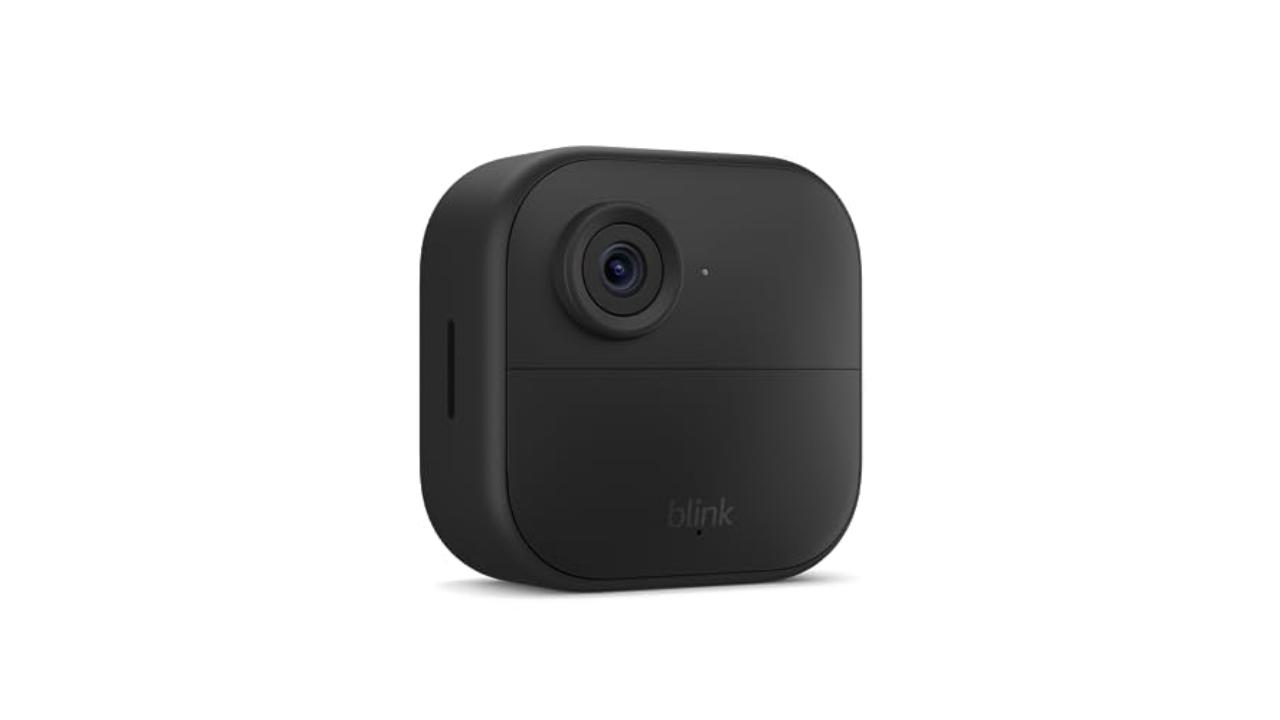
Blink’s latest wireless security cameras may be named “outdoor,” but they’re some of the best to use as home security for both the interior and exterior of your home. These battery-powered cameras run on two AA cells, so you can place them anywhere you want, and they have a battery life of around two years before the cells need replacing. Blink Outdoor 4 home security cameras are weather resistant and support night vision, motion detection and two-way audio. You can store clips in the cloud via the Blink Subscription Plan or you can also save events locally to a Sync Module 2 via a USB flash drive (sold separately). Unfortunately, Blink works with Alexa only, which could be a non-starter for some.

$45 at Amazon

Image for the large product module

Arlo

If you want a camera specifically for your front door, a doorbell camera makes more sense than a standalone option. We like the latest Arlo Video Doorbell 2K, which is compatible with Google Assistant and Amazon’s Alexa. It delivers high-quality 2K footage along with a 180-degree view so you can see a person from head to toe and it can ring your phone with a video call whenever someone rings the bell. There’s also two-way audio so you can talk to whoever’s at the door.

A highlight of this doorbell is that it comes with a 30-day trial to Arlo’s Secure subscription service, which includes a motion detection feature that can tell the difference between a person, package, vehicle or animal. Senior Editor Devindra Hardawar said that he really appreciated the package alerts when he tested out a previous version of the doorbell; it did a good job of telling him whenever UPS dropped off a box. It’s such a useful feature, in fact, that we recommend keeping the service beyond the trial period.

In addition to the improved 2K video resolution, the latest Arlo Video Doorbell includes an integrated siren, enhanced night vision, an IP65-rated design and the ability to install it wired or wirelessly. There’s also an HD version that’s a bit cheaper (the 2K model typically goes for $130, but you can snag the HD version for only $80) if you want to save some money upfront.

$60 at Amazon

Best smart home gadgets for 2025: IoT gear

Image for the large product module

iRobot

This model is an updated version of the Roomba 694, a previous favorite budget robot vacuum. Not much has changed here aside from a few design tweaks that result in a simplified silhouette and a larger battery. Otherwise, you’re still getting an excellent, entry-level robot vacuum that has powerful suction for the price, smart navigation for more efficient cleaning and app connectivity. iRobot’s app is really easy to use for luddites and the tech savvy alike. And just in case you don’t have access to the app — maybe you left your phone in another room, for example — this Roomba has a couple of on-device buttons for quick controls.

One of the reasons this model cleans so well is that it has a three-stage system that tells it to suck up dirt while also navigating around obstacles. When it encounters an especially filthy area, it focuses in on it, making sure it’s clean before moving on. You can also manually instruct it to clean a specific spot in case you need it. And if you prefer to talk to your robot vacuum cleaner, this Wi-Fi-connected Roomba works well with both Alexa.

$240 at Amazon

Image for the large product module

Photo by Devindra Hardawar / Engadget

Read our full review of the Roomba Combo j9+

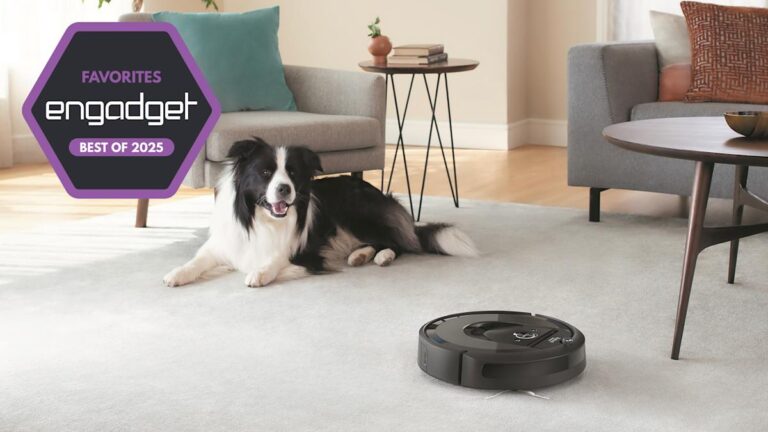
The Roomba Combo j9+ has everything we want in a combination robotic vacuum and mop. It offers incredibly powerful suction, deep floor scrubbing and a slew of smarts to avoid obstacles (including cat and dog poop!). It’s a better vacuum than its predecessor, the Roomba Combo j7+, and it also features a new Clean Base that can automatically refill its liquid tank. More than any Roomba before it, the Combo j9+ can make your floors sparkly clean with very little intervention on your part.

While it’s expensive, the Roomba Combo j9+ certainly beats paying for a professional cleaning service. It’s one of the best robotic vacuums and mops for pet owners, especially for its ability to avoid pet waste. In fact, if the j9+ ends up making a poopy mess due to cat or dog droppings, iRobot will send you a replacement unit for free. (That offer only works for the first year, and it only applies to solid waste from cats and dogs, but it’s still a helpful guarantee for pet owners afraid of the havoc that a robo-vac might wreak.)

The Roomba Combo j9+ features home mapping and can accurately map your home far faster than any previous Roomba, and you can also use the iRobot app to specify room borders. You can also create cleaning routines and label objects to help it clean exactly where you’d like. The j9+ works with smart assistants from Amazon and Google as well, so you can just shout out cleaning requests to your smart speaker. While it’s not a completely magical cleaning robot – you’ll still need to clear up your floors to help it run well – it’s certainly the closest we’ve seen yet to the ideal robotic vacuum and mop for whole-home deep cleaning. — Devindra Hardawar, Senior Reporter

$799 at Amazon

Image for the large product module

Photo by Amy Skorheim / Engadget

Smart plugs are the easiest way to add a bit of connectivity to your home without spending a ton of money. Connect your regular non-smart lamp and voila, it’s internet connected and you didn’t have to spend a fortune. The best one we’ve tried is from TP-Link: the Kasa Smart Plug Mini. Out of all of the smart plugs we tested, this one was the only plug that provided a truly seamless experience from the jump. It was easy to set up, thanks in part to the Kasa mobile app’s clean and intuitive UI, and it supports all of the features you’d expect from a smart plug: timers, schedules, vacation mode and custom scenes. The updated version of the Smart Plug Mini supports HomeKit in addition to Google Home, Amazon Alexa and Samsung SmartThings, so it should fit into any existing smart home ecosystem you have.

$37 at Amazon

Image for the large product module

Photo by Daniel Cooper / Engadget

TP-Link’s Deco XE75 Wi-Fi 6 router system strikes a good balance of user-friendliness and power. The three-pack contains a trio of unassuming white columns that provide up to 7,200 square feet of Wi-Fi 6 coverage, which should make it enough (and possibly even overkill) for most homes. The system offers try-band speed with a dedicated Wi-Fi 6 band that you can use as either a dedicated backhaul or a network for you to directly connect your Wi-Fi 6 devices. In our testing, we found the setup to be painless and the connection to be stable and reliable. On top of that, the tree-pack is adequately priced, especially compared to some overpriced and overpowered competitors out there.

$270 at Amazon

How to pick the right voice assistant before you buy smart gadgets

While plenty of the best smart home devices are platform agnostic, there are some — smart speakers and smart displays in particular — that require you to choose your voice control assistant. Currently, that means deciding if you’ll use the Google Assistant or Amazon’s Alexa on a regular basis (I’ll address Siri in a moment.)

They’re both compatible with various smart home tech products from light switches and bulbs to robot vacuums, but there are certain devices that work best with either Google or Amazon. Nest products, for example, are more compatible and have more functionality with Google-powered speakers and displays. They can still work with Amazon devices, but certain features might be disabled. The same holds true with Amazon products: They work better if they’re in the same ecosystem.

Amazon Alexa

So how do you choose between Alexa and Google Assistant? It really depends on your personal preferences. Do you listen to Audible, watch Prime Video and tend to do a lot of shopping on Amazon? Then you might lean toward an Alexa-powered home automation setup. Alexa supports a wide range of devices — including smart locks, smart thermostats and motion sensors — and many of its speakers and displays include remote control functionality for lights, plugs and other smart gear.

Google Assistant

If you want a voice assistant that’s great at answering questions, Google Assistant tends to be better than Alexa. Amazon’s helper, on the other hand, currently supports more smart home products. The company’s smart speakers and displays also support the Zigbee smart home protocol, and some devices even have built-in smart home hubs. Both Google and Amazon devices can sync with your calendar, though Google’s tend to work better with Google services. Plus, if you already have an Android smartphone, you might be more comfortable with Google Assistant anyway.

Siri

But what about Siri? Apple’s assistant supports voice control as well, but it doesn’t have as many compatible devices as Google or Amazon. The HomePod mini and the full-sized HomePod are the only Siri-compatible speakers on the market at the moment, too. That said, it’s not too hard to find Apple HomeKit-compatible gear as more third-party companies add support for it, but you currently have a smaller pool of devices to choose from.


Source link

LineageOS now officially supports the Pixel 9a

0


Almost half a year after launch, the Pixel 9a is now part of the official LineageOS build roster and comes full circle on Pixel 9 series support.

While we are just off the back of the sizable Android 16 QRP1 update, there are bound to be Pixel 9a owners who want to at least trial the latest LineageOS 23 builds on their phones for even more control, customization, or just peace of mind with regard to privacy – albeit a smaller component here versus GrapheneOS.

Given Google’s delays in releasing Pixel kernel source code, if you opt to slap LineageOS 23.0 on your phone, you will be running a marginally out-of-date release, given that QPR1 supersedes this build based on the June release of Android 16. As we saw with the OnePlus 13 drop just a few days ago, this does mean you’ll be running an older version and will miss out on the Material 3 Expressive update here.

This might be a roadblock for some of you who might otherwise want to give LineageOS a trial run on a Pixel 9a. Moreover, we’re just a few weeks away from the QPR2 release, which will exacerbate the issue further in the near future. The addition of new hardware to the LineageOS build roster has slowed over the past 12 months, but almost all recent Pixel hardware is supported within a few weeks of launch. This is one of the longest periods given Google’s heel-dragging over source code.

Advertisement – scroll for more content

We’re hopeful that the Pixel 10 lineup will be supported in the coming months – ideally before the potential mid-2026 launch of the Pixel 10a.

If you are an intrepid owner, LineageOS 23.0 builds are not yet available to flash on the Pixel 9a, but we expect that to change over the coming days, and you can check here with detailed instructions available on the Lineage website.

More on LineageOS:

FTC: We use income earning auto affiliate links. More.


Source link

Former Vice President Dick Cheney dies at 84

0


Dick Cheney, the hard-charging conservative who became one of the most powerful and polarizing vice presidents in U.S. history and a leading advocate for the invasion of Iraq, has died at age 84.

The quietly forceful Cheney served father and son presidents, leading the armed forces as defense chief during the Persian Gulf War under President George H.W. Bush before returning to public life as vice president under Bush’s son, George W. Bush.

Cheney was, in effect, the chief operating officer of the younger Bush’s presidency. He had a hand, often a commanding one, in implementing decisions most important to the president and some of surpassing interest to himself — all while living with decades of heart disease and, post-administration, a heart transplant. Cheney consistently defended the extraordinary tools of surveillance, detention and inquisition employed in response to the terrorist attacks of Sept. 11, 2001.

Years after leaving office, he became a target of President Donald Trump, especially after daughter Liz Cheney became the leading Republican critic and examiner of Trump’s desperate attempts to stay in power after his election defeat and his actions in the Jan. 6, 2021, riot at the Capitol.

“In our nation’s 246-year history, there has never been an individual who was a greater threat to our republic than Donald Trump,” Cheney said in a television ad for his daughter. “He tried to steal the last election using lies and violence to keep himself in power after the voters had rejected him. He is a coward.”

In a twist the Democrats of his era could never have imagined, Dick Cheney said last year he was voting for their candidate, Kamala Harris, for president against Trump.

A survivor of five heart attacks, Cheney long thought he was living on borrowed time and declared in 2013 he now awoke each morning “with a smile on my face, thankful for the gift of another day,” an odd image for a figure who always seemed to be manning the ramparts.

His vice presidency defined by the age of terrorism, Cheney disclosed that he had had the wireless function of his defibrillator turned off years earlier out of fear terrorists would remotely send his heart a fatal shock.

In his time in office, no longer was the vice presidency merely a ceremonial afterthought. Instead, Cheney made it a network of back channels from which to influence policy on Iraq, terrorism, presidential powers, energy and other cornerstones of a conservative agenda.

Fixed with a seemingly permanent half-smile — detractors called it a smirk — Cheney joked about his outsize reputation as a stealthy manipulator.

“Am I the evil genius in the corner that nobody ever sees come out of his hole?” he asked. “It’s a nice way to operate, actually.”

A hard-liner on Iraq who was increasingly isolated as other hawks left government, Cheney was proved wrong on point after point in the Iraq War, without ever losing the conviction that he was essentially right.

He alleged links between the 2001 attacks against the United States and prewar Iraq that didn’t exist. He said U.S. troops would be welcomed as liberators; they weren’t.

He declared the Iraqi insurgency in its last throes in May 2005, back when 1,661 U.S. service members had been killed, not even half the toll by war’s end.

For admirers, he kept the faith in a shaky time, resolute even as the nation turned against the war and the leaders waging it.

But well into Bush’s second term, Cheney’s clout waned, checked by courts or shifting political realities.

Courts ruled against efforts he championed to broaden presidential authority and accord special harsh treatment to suspected terrorists. His hawkish positions on Iran and North Korea were not fully embraced by Bush.

Cheney operated much of the time from undisclosed locations in the months after the 2001 attacks, kept apart from Bush to ensure one or the other would survive any follow-up assault on the country’s leadership.

With Bush out of town on that fateful day, Cheney was a steady presence in the White House, at least until Secret Service agents lifted him off his feet and carried him away, in a scene the vice president later described to comical effect.

From the beginning, Cheney and Bush struck an odd bargain, unspoken but well understood. Shelving any ambitions he might have had to succeed Bush, Cheney was accorded power comparable in some ways to the presidency itself.

That bargain largely held up.

“He is constituted in a way to be the ultimate No. 2 guy,” Dave Gribbin, a friend who grew up with Cheney in Casper, Wyoming, and worked with him in Washington, once said. “He is congenitally discreet. He is remarkably loyal.”

As Cheney put it: “I made the decision when I signed on with the president that the only agenda I would have would be his agenda, that I was not going to be like most vice presidents — and that was angling, trying to figure out how I was going to be elected president when his term was over with.”

His penchant for secrecy and backstage maneuvering had a price. He came to be seen as a thin-skinned Machiavelli orchestrating a bungled response to criticism of the Iraq war. And when he shot a hunting companion in the torso, neck and face with an errant shotgun blast in 2006, he and his coterie were slow to disclose that extraordinary turn of events.

The vice president called it “one of the worst days of my life.” The victim, his friend Harry Whittington, recovered and quickly forgave him. Comedians were relentless about it for months. Whittington died in 2023.

When Bush began his presidential quest, he sought help from Cheney, a Washington insider who had retreated to the oil business. Cheney led the team to find a vice presidential candidate.

Bush decided the best choice was the man picked to help with the choosing.

Together, the pair faced a protracted 2000 postelection battle before they could claim victory. A series of recounts and court challenges — a tempest that brewed from Florida to the nation’s highest court — left the nation in limbo for weeks.

Cheney took charge of the presidential transition before victory was clear and helped give the administration a smooth launch despite the lost time. In office, disputes among departments vying for a bigger piece of Bush’s constrained budget came to his desk and often were settled there.

On Capitol Hill, Cheney lobbied for the president’s programs in halls he had walked as a deeply conservative member of Congress and the No. 2 Republican House leader.

Jokes abounded about how Cheney was the real No. 1 in town; Bush didn’t seem to mind and cracked a few himself. But such comments became less apt later in Bush’s presidency as he clearly came into his own.

Cheney retired to Jackson Hole, not far from where Liz Cheney a few years later bought a home, establishing Wyoming residency before she won his old House seat in 2016. The fates of father and daughter grew closer, too, as the Cheney family became one of Trump’s favorite targets.

Dick Cheney rallied to his daughter’s defense in 2022 as she juggled her lead role on the committee investigating Jan. 6 with trying to get reelected in deeply conservative Wyoming.

Liz Cheney’s vote for Trump’s impeachment after the insurrection earned her praise from many Democrats and political observers outside Congress. But that praise and her father’s support didn’t keep her from losing badly in the Republican primary, a dramatic fall after her quick rise to the No. 3 job in the House GOP leadership.

Politics first lured Dick Cheney to Washington in 1968, when he was a congressional fellow. He became a protégé of Rep. Donald Rumsfeld, R-Ill,, serving under him in two agencies and in Gerald Ford’s White House before he was elevated to chief of staff, the youngest ever, at age 34.

Cheney held the post for 14 months, then returned to Casper, where he had been raised, and ran for the state’s single congressional seat.

In that first race for the House, Cheney suffered a mild heart attack, prompting him to crack he was forming a group called “Cardiacs for Cheney.” He still managed a decisive victory and went on to win five more terms.

In 1989, Cheney became defense secretary under the first President Bush and led the Pentagon during the 1990-91 Persian Gulf War that drove Iraq’s troops from Kuwait. Between the two Bush administrations, Cheney led Dallas-based Halliburton Corp., a large engineering and construction company for the oil industry.

Cheney was born in Lincoln, Nebraska, son of a longtime Agriculture Department worker. Senior class president and football co-captain in Casper, he went to Yale on a full scholarship for a year but left with failing grades.

He moved back to Wyoming, eventually enrolled at the University of Wyoming and renewed a relationship with high school sweetheart Lynne Anne Vincent, marrying her in 1964. He is survived by his wife, by Liz and by a second daughter, Mary.

If you purchase a product or register for an account through a link on our site, we may receive compensation. By using this site, you consent to our User Agreement and agree that your clicks, interactions, and personal information may be collected, recorded, and/or stored by us and social media and other third-party partners in accordance with our Privacy Policy.


Source link

a16z pauses its famed TxO Fund for underserved founders, lays off staff

0


Andreessen Horowitz is pausing its Talent x Opportunity (TxO) fund and program, according to four sources familiar with the matter, including more than one founder in the program. 

The firm announced TxO in 2020 to support founders who do not have access to traditional venture networks. Many of TxO’s participants were women and minorities who, overall, receive very slim amounts of venture capital dollars.

The announcement of the fund came during the wave of support that underrepresented founders received in 2020 after the murder of George Floyd. The fund launched with $2.2 million in initial commitments, TechCrunch previously reported, with a16z co-founder Ben Horowitz and his wife, Felicia, matching up to an additional $5 million.

TxO provided founders with access to tech networks, a 16-week-long training program, and a $175,000 investment through a donor-advised fund managed by the nonprofit Tides Foundation. The program went on to support more than 60 companies (like the media brand Brown Girl Magazine, food tech Myles Comfort Foods, and the maternity tech Villie). 

TxO garnered some criticism when it launched because it’s technically structured as more of a nonprofit, rather than a traditional investment fund. Those investing in the fund are considered donors, and the money given is regarded as charity donations, rather than traditional limited partner investments.

Still, founders who participated in the program and spoke to TechCrunch said it provided them with invaluable support and opportunities to which they otherwise would not have access. Last year, TxO expanded to launch a grant program, providing $50,000 to three tech nonprofits that support underserved founders. 

TxO announced its — as of now — last cohort of the program in early March 2025. Founders who partook in the program received an email on October 16 from Kofi Ampadu, the partner at a16z who led TxO, announcing the program would pause. 

Techcrunch event

San Francisco
|
October 13-15, 2026

“When we launched TxO, the mission was clear: support talented, determined builders who are creating culture-shaping companies but may not have access to typical Silicon Valley networks and resources,” Ampadu’s email read, as seen by TechCrunch. “While that purpose has not changed, we are pausing our existing program to refine how we deliver on it.”

The rest of the email read:  

Over the past five years, we’ve experimented with different models for best serving founders — from virtual and in-person programming to curriculum design and funding structure. As we rethink what’s next, we’ll be applying everything we’ve learned and evolving how we support founders by integrating with a16z’s broader early-stage investing and company building strategy.  

TxO has backed more than 60 companies and nearly 100 founders. You have collectively raised tens of millions in follow-on capital and reached customers across culture and lifestyle. Founders from earlier cohorts now advise newer ones, and that peer support has strengthened the entire community.  

Thank you for being at the center of this community. Your progress is proof of what is possible. Stay tuned for what comes next. In the meantime, if you have any questions, please don’t hesitate to reach out directly.

Best regards,

Kofi

A16z confirmed to TechCrunch that the program was shutting down and that Ampadu alerted participants via email.

Members of the TxO staff team, which had at least three people, excluding Ampadu, were also let go, according to two sources, with the end of October being their last week. 

The fund’s application documents did not specifically call for founder diversity, except in terms of “cultural authenticity,” and also emphasized classic startup investment criteria like size of the market and ability to execute.  But the announcement of the fund back in 2020 made clear it was “for entrepreneurs who did not have access to the fast track in life but who have great potential. Their products can be non-tech or tech; they should be from underserved communities (all backgrounds welcome).”

Still, many in the startup world perceived TxO as an accelerator for diverse talent, and several people who spoke to TechCrunch pointed out that its hiatus comes as top names in tech eliminate, cut, reframe, or completely walk back on prior public commitments related to diversity, equity, and inclusion. The Trump administration has threatened legal and political ramifications for businesses supporting anything that could be seen as DEI. 

Others, however, noted that a16z is still interested in accelerator-type startup programs. Earlier this year, it launched Speedrun, a program that promises cohort grads up to $1 million of investment.


Source link

Apple’s App Store website is actually an app store website now

0


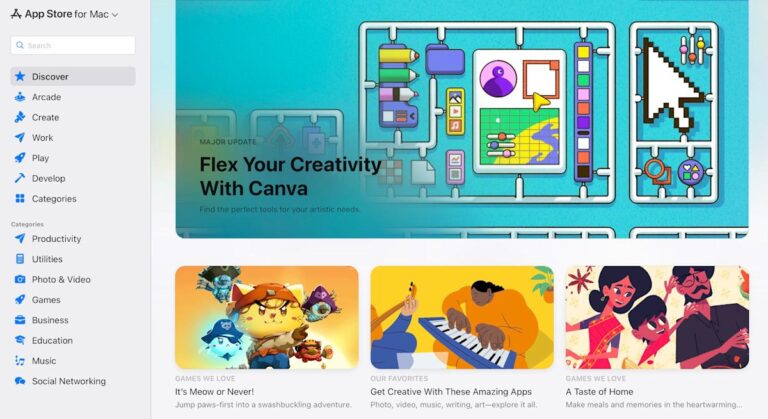
For those of us living in the Apple ecosystem, the App Store is second nature. It’s a core part of the Apple experience and the go-to spot for any applications you might want for your device. So I was fairly shocked to learn that up until today, the link apps.apple.com would send you to a page with information about the App Store, but not actually take you to said digital storefront.

That’s right, it took until the year 2025 for Apple to create a browser version of the App Store.

Maybe it never seemed necessary since the App Store is pre-loaded on any Apple device. I don’t foresee many edge cases where I’d want to look in a browser rather than actually use the App Store on one of my machines, although I’m sure now that I’ve said so, I’ll wind up doing exactly that within a week. But still, the first App Store debuted 17 years ago. Which, particularly in tech years, is a really, really long time.

In any case, the browser App Store lets you pick your hardware platform from a dropdown on the far left, so you can peruse software for different platforms wherever you’re on the web. There’s also a search field as well as a list of app categories that you can sift through. All the stuff you’d expect from the actual App Store, just in a browser. Entries for specific applications will prompt you to open the listing in the device’s App Store where the button would normally let you buy the software. Which leaves me once again surprised this took so long to create and also questioning who will actually use it.


Source link