Home Blog Page 164

What Google Material 3 Expressive redesigns are rolling out [U]

0


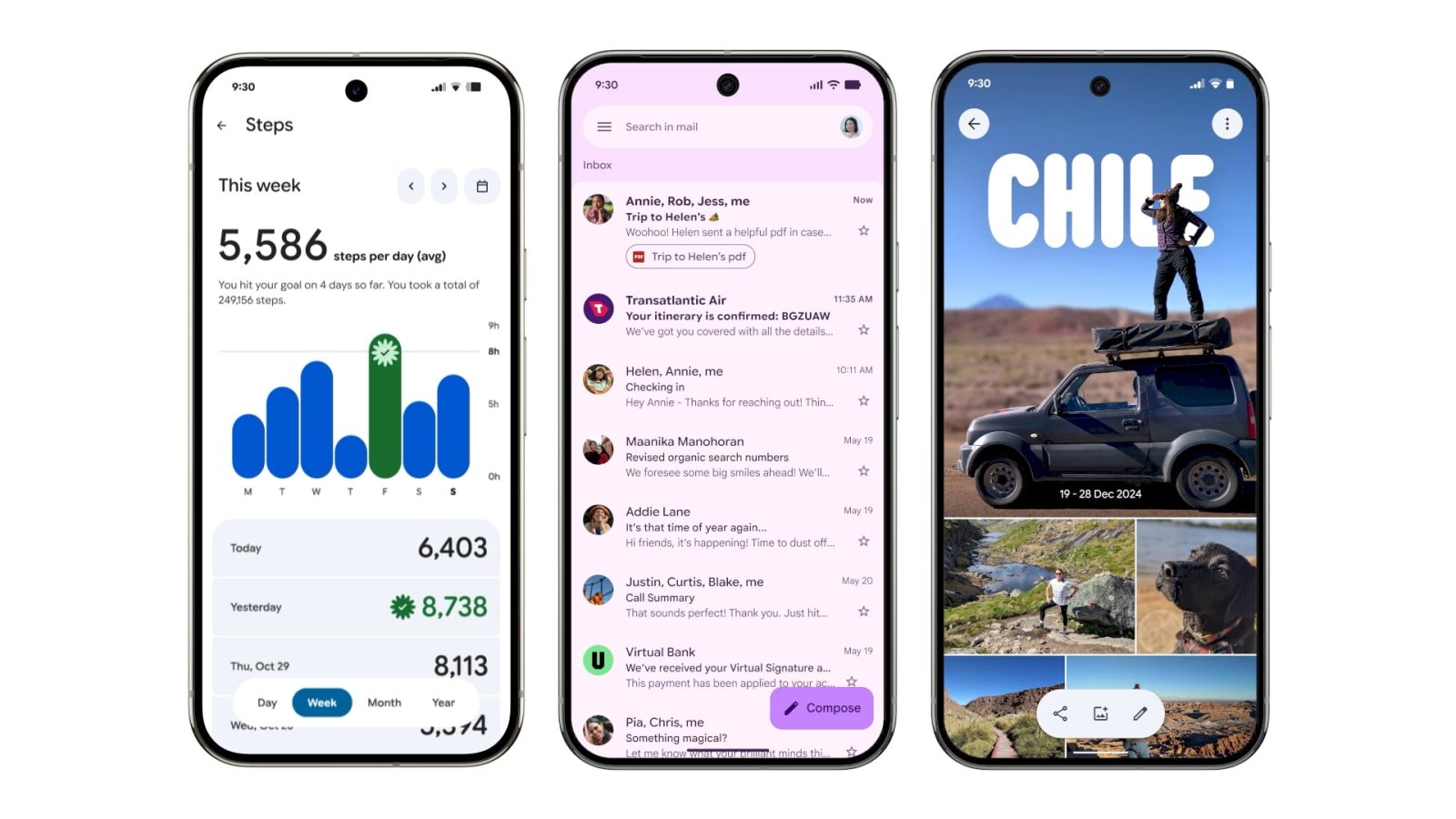
Google announced its new design language in May. Material 3 Expressive redesigns have been rolling out to Google apps since then, but the Pixel 10 and Android 16 QPR1 launch really kicked things off. Here’s our list of what’s available and still to come on Android phones.

Updated 10/12: Refer to the table for what’s New and Updated.

Recent launches

[New] Pixel Watch II

With the launch of the Pixel Watch 4, the companion app gets a new icon and more Material 3 Expressive. The initial redesign just applied to the homepage, with this second wave updating all menus with containers for improved visual separation.

More

Advertisement – scroll for more content

[New] Google Wallet

In the top-left corner, “Wallet” has been replaced by the app logo, while there’s now a large FAB (floating action button) for Add to Wallet. Containers are leveraged throughout the app for Settings and Recent activity.

More

The NFC tap-to-pay animation also gets M3 Expressive. The background is now translucent with your card jumping up and down as part of a more animated success animation. Additionally, Google has a new overlay on newer Pixel phones with the double-tap power button gesture.

[New] Google Home

The redesigned Google Home app features some Material 3 Expressive components like morphing buttons when you swipe between the Home feed’s top tabs and in the Automations creator. The “Ask Home” field is similar in function to a search app bar, while the glow that appears on app launch is certainly delightful. That said, it’s still a tall bottom bar.

More

Rolling out

Gmail II

The next phase of Gmail’s redesign is placing each message on the homepage in a container, with a narrow left/right border now existing.

More

Google Chrome

On the main browsing interface, a partitioned Material 3 progress indicator is now used. Circular containers are leveraged for the top row of actions in the overflow menu. In the Tab Grid, the new tab button and standard/Incognito/Groups switcher are placed in containers. Google is also prominently theming the frame of Tab Group cards with the color you’ve selected.

More

Fully launched

(In alphabetical order)

Digital Wellbeing

Just the main page for this “app” (within Settings) has been updated with M3 Expressive. Besides containers, the donut graph is thicker. This is rolling out with beta version 1.30.x.

Files by Google

There’s an animated Material 3 carousel on the homepage with a pill-shaped toolbar for Quick Share and document scanning, while a navigation rail is now leveraged. When opening an image, there’s a toolbar for editing and Circle to Search. List views have larger previews at the left.

More

Find Hub

There’s a shorter bottom bar, while the sheet features more prominently rounded corners. One nice usability is how device pins are now larger.

More

Gmail

Your list of emails and the actual message are placed in a container, while there’s a prominent pill-shaped animation when using the swipe gestures. Meanwhile, a search app bar sees the hamburger button and profile menu move out of the pill-shaped field.

More

Google Calculator

Version 9.0 hides the row of scientific functions, while there’s now a history button (but the slide down gesture remains).

More

Google Calendar

Time slots (hours and days) are placed in their own rounded container throughout the app’s various views (Day, Week, Month). This replaces the faint lines used previously, while there’s now a solid background layer in the primary Dynamic Color. More

Additionally, a FAB menu is now leveraged for Event, Task, Out of office, and Birthday creation.

Widgets will get a pill-shaped button in the top-right corner, while most views drop the two-column layout.

Google Chat

Like Gmail, Google Chat makes use of a chat app bar and places the list of messages in a container. The floating toolbar leverages a pill to highlight what tab you’re currently viewing, while the chat interface places the ‘plus’ menu in a vertical pill.

Google Clock

Version 8.1 is rolling out with a shorter bottom bar and a new font, while it’s now a rounded square FAB at the right.

More

Google Contacts

This straightforward redesign places everything in containers, while the bottom bar is now shorter. There are also color tweaks to the app’s background.

More

Google Docs, Sheets, and Slides

The updates in these three apps specifically apply to the editor interface with the new Material 3 Expressive progress indicator when waiting for documents to load. Pill-shaped buttons are used throughout, while the Format sheet is thoroughly modernized, including with the split button component.

More

Google Drive

This redesign gets a search app bar, short bottom bar, FAB menu, and button groups, while each line item is placed in a container.

More

The camera scanner is getting a redesigned editor that leverages Material 3 Expressive.

More

Google Keep

Google Keep makes use of the new M3 Expressive search app bar component that moves the hamburger button and profile switcher outside of the search bar, which is now thicker. The other main update is on the notes page with all buttons (Archive, ‘plus’ menu, overflow, etc.) placed in containers.

Wide

Google Maps

Listings in Google Maps now make use of M3 Expressive containers to better group information. Additionally, the actions carousel more consistently appears at the bottom of your screen.

More

Google Meet

Google Meet is the first app to have widely rolled out a Material 3 Expressive redesign. On the homepage, each call is placed in a large/tall card as part of M3E’s heavy use of containers.

The pre-call screen sees more M3 Expressive with very large voice and video call buttons that seem out of proportion. The name, picture, and email address of who you’re calling is placed in a pill and centered at the top. Various buttons go from circles to rounded squares.

More

Google Messages

The list of conversations and message thread itself is now placed in containers. Google has also redesigned the ‘plus’ menu with all the buttons placed in pills. Other parts of the app getting Material 3 Expressive include New chat, Search, and Settings.

More23

Google One

The app switches to a shorter bottom bar, while the cards (and Settings) are placed in more prominent containers. Meanwhile, Google One has removed its infographics for a denser app.

More

Google Password Manager

There’s a new search app bar with the Password Manager in the top-left corner. Filters for All, Passwords, Passkeys, and Network devices make a nice functionality update, while credentials are placed in containers.

More

Google Photos

A new backup indicator at the top of the app replaces “Google Photos.” On launch, you briefly get a logo that animates into “Backup complete.” You can drag down (pull-to-refresh) to see cycling Material 3 Expressive shapes on a background layer that also notes how much you have stored in the cloud. When something is backing up, there’s a wavy progress indicator.

More

Google TV

The Google TV app has a short bottom bar with a white accent color that is also used in three of the four tabs for the search pill. In the For you tab, that button is themed based on the media carousel.

Meanwhile, the remote gets updated button shapes. There’s also a morphing split button at the top for the device menu.

More

My Pixel

The Pixel Tips app is now called “My Pixel” and gets a complete overhaul that adds support options and a full Google Store.

More

Phone by Google

Compared to other apps, Phone by Google is using Material 3 Expressive as an opportunity for a complete overhaul. The bottom bar goes from four tabs to three with Favorites and Recents becoming “Home.” There’s a new “Keypad” tab that replaces the FAB, while “Voicemail” is unchanged. Contacts can now be found in a navigation drawer. All calls and lists (including Settings) make use of containers.

The Incoming and In-Call screens feature updated buttons with larger touch targets. You can pick between Horizontal swipe or Single tap.

Wide

Pixel Buds

The big update is to the Equalizer and how you customize Bud gestures.

More

Pixel Recorder

This Material 3 Expressive redesign aims to greatly simplify Recorder. For example, there’s an overflow sheet for the vast majority of actions on the recording page. The capture interface has also been simplified.

More

Pixel Screenshots

There’s now a rounded square FAB and other M3 Expressive tweaks.

Pixel Studio

Besides dropping the “preview” status, Pixel Studio 2.0 introduces a new image editor that replaces Markup in most instances. Featuring a Material 3 Expressive design, crop, draw/highlight, and caption are joined by generative AI tools. You can make stickers, erase, and change a selected part using prompts.

More

Pixel VIPs

Pill-shaped containers replace the circular buttons.

Pixel Watch

More

Pixel Weather

The Pixel Weather homepage expands the size of the city cards. You go from being able to see 10 locations to just six, but the high and low is now included. There are minor tweaks in the city view, with the big update being native homescreen widgets.

More

Quick Share

The new fullscreen Quick Share experience takes full advantage of Material 3 Expressive.

More

FTC: We use income earning auto affiliate links. More.


Source link

13-year-old Brazilian boy transferred to Virginia facility after ICE detention

0


A 13-year-old boy from Everett who was arrested and detained by Immigration and Customs Enforcement (ICE) has been transferred to a juvenile facility in Virginia.

Andrew Lattarulo, of Georges Cotes Law, said his firm received an email from the U.S. Attorney’s Office confirming the child was transferred on Friday at 9:30 a.m. He forwarded the email to MassLive.

The boy is still in custody, Lattarulo said.

The transfer occurred on the same day Judge Richard G. Stearns of the Boston federal court ordered the boy’s release by Tuesday unless ICE and the Department of Homeland Security could provide grounds for continued detention, according to court documents

ICE arrested the boy, whose family is from Brazil, after an interaction with the Everett Police Department, the Boston Globe reported.

The boy’s mother received a call on Thursday to pick her son up from the department; however, an hour and a half later, she was told ICE had taken her son, the Globe reported.

ICE and the Everett Police Department did not immediately respond to requests for comments on Monday.

This is not the first time ICE has detained someone younger than 18 in Massachusetts.

In September, ICE detained a 16-year-old boy in Milford during a traffic stop.

The teenager’s attorney, Jill Seeber, previously told WHDH-TV in Boston that the teenager went to get a snack at a nearby bakery when he stopped to talk to somebody that he knew. ICE agents then detained him, according to Seeber.

The boy was released from detention and was taken home by agents.

Department of Homeland Security Assistant Secretary of Public Affairs Tricia McLaughlin previously told MassLive that ICE had no idea that the teenager was a minor and that he was detained “to determine his identity and if he was a potential safety threat.”

“ICE does NOT target juveniles or children,” DHS Assistant Secretary of Public Affairs Tricia McLaughlin said in a statement to MassLive. “At the time of the detainment, ICE had no knowledge of the individual’s age.”

If you purchase a product or register for an account through a link on our site, we may receive compensation. By using this site, you consent to our User Agreement and agree that your clicks, interactions, and personal information may be collected, recorded, and/or stored by us and social media and other third-party partners in accordance with our Privacy Policy.


Source link

Remembering beloved actress and style icon Diane Keaton

0


Actress and style icon Diane Keaton has died at age 79. Known mostly for comedy, the Oscar-winning star of “Annie Hall” had an impressive, wide-ranging resume.


Source link

Strava eyes IPO as Gen Z trades dating apps for running clubs

0


Strava, the 16-year-old fitness tracking app, is gearing up to go public, the Financial Times reports.

CEO Michael Martin told the FT that the San Francisco company plans to list “at some point,” eyeing capital for more acquisitions. The company, backed by Sequoia Capital, TCV, and Jackson Square Ventures, was last valued at $2.2 billion in May.

Strava has the wind at its back, certainly. The app’s user base has exploded to 50 million monthly active users in 2025, according to Sensor Tower – nearly double its closest competitor, with downloads up 80% year-over-year.

Strava’s growth coincides with a cultural shift around running, particularly as people in their teens and 20s seek more alcohol-free ways to socialize. Runners also emphasize the mental health benefits of finding support networks (and, sometimes, romance). Applications for the 2026 London Marathon jumped 31% this year to 1.1 million people.

Strava’s secret sauce? Turning workouts into social currency with “kudos” and split comparisons. Sensor Tower estimates consumers spent over $180 million on its subscription tier through September – a figure Strava says significantly underestimates actual revenue. The company also earns from sponsored challenges and brand partnerships.


Source link

SpaceX will attempt Starship’s 11th flight test on Monday

0


SpaceX is gearing up for the 11th flight test of its Starship megarocket, which will launch from its Starbase in Texas as early as Monday. The launch window opens on October 13 at 7:15PM ET. You’ll be able to watch live starting 30 minutes before liftoff on the SpaceX website and on X. 

Starship’s latest flight follows a successful test at the end of August, during which it deployed a payload — eight dummy Starlink satellites — in space for the first time following a failed attempt earlier in the year. The company is aiming to carry out another payload demonstration for flight 11, again using eight Starlink simulators. For this flight, SpaceX is using a previously flown Super Heavy booster, with 24 of its 33 Raptor engines being flight-proven. The goals this time around include “flight experiments gathering data for the next generation Super Heavy booster, stress-testing Starship’s heatshield, and demonstrating maneuvers that will mimic the upper stage’s final approach for a future return to launch site.”

SpaceX won’t attempt to catch Super Heavy in its “chopsticks” back at the launch site this time. The booster is instead expected to end up in the Gulf of Mexico, while Starship will splash down in the Indian Ocean.


Source link

Google apps on iOS get Account menu redesign

0


Following Android, most Google apps on iOS now have the redesigned Google Account menu and switcher. 

Previously, tapping the profile picture in the top-right corner of every Google application would open a floating window that lists all the accounts signed into your device. This pop-up let you see the app’s background to preserve context. 

Old vs. new

On iOS, Google has migrated to a panel that slides up from the bottom of your screen. The first line has your Gmail address, with “Done” (instead of ‘x’) now at the right. You get a large circular avatar with a “Hi, [name]!” greeting and bigger “Manage your Google Account” button. There’s a “Switch account” dropdown menu that also lets you “Add another account” or “Manage accounts on this device.” Each item is placed in a Material 3 Expressive container.

Advertisement – scroll for more content

Next is a “More from [app]” section that lists app-specific actions, like settings or whatever secondary navigation the application has placed there. When you scroll down, the profile image gets docked next to the email in the top line.

On the iPad, apps use a floating window instead of going fullscreen.

Overall, this is a more prominent interface that is more obvious and user-friendly in some regards. However, in taking over the entire screen, context is lost. This redesign matches what you already get on the web. 

As a reminder, you can still swipe up/down on the profile image to quickly switch accounts without leaving the app’s homepage.

On iOS, most Google apps now have this Account menu redesign. Gemini, Google Home, Photos, and Translate put many items in the account menu. In comparison, Google Workspace apps — Docs, Drive, Gmail, Keep, Meet, Sheets, Slides and Tasks — do not. 

Big applications that haven’t been updated include Google (Search) and Maps. The YouTube family of apps continue to have their own design language. 

FTC: We use income earning auto affiliate links. More.


Source link

Motorcyclist flown to hospital after crash on Cape Cod

0


A motorcyclist was flown to a hospital after crashing with an SUV on Cape Cod Saturday afternoon, according to police.

Officers responded to the crash at 6 Head of the Bay Road in Bourne around 2 p.m., Bourne police said in a press release. At the scene, they found the motorcyclist — a 22-year-old Taunton man — lying on the ground with serious injuries.

Officers provided the man medical aid until paramedics arrived, police said. He was then flown to a local hospital via medical helicopter.

Bourne Motorcycle Crash
A motorcycle and an SUV collided in Bourne Saturday afternoon.Bourne Police Department

The SUV driver — an 84-year-old Bourne man — stayed at the scene and did not report an injuries resulting from the crash, police said.

A regional Cape Cod law enforcement crash reconstruction team is investigating the crash. No further information has been released.

If you purchase a product or register for an account through a link on our site, we may receive compensation. By using this site, you consent to our User Agreement and agree that your clicks, interactions, and personal information may be collected, recorded, and/or stored by us and social media and other third-party partners in accordance with our Privacy Policy.


Source link

The ZoraSafe app wants to protect older people online and will present at TechCrunch Disrupt 2025 

0


Apart from antivirus apps, the cybersecurity industry has traditionally been business to business, with regular internet users left on their own to protect themselves. And older people, who did not grow up with the internet and smartphones, are perhaps the most vulnerable. 

ZoraSafe, a startup founded by sisters Catherine Karow and Ellie King Karow wants to step in and help them out. Their idea is to create an app that not only protects older people against scammers and hackers, but also teaches them how to stay safe through gamified microlearning, as Catherine and Ellie told TechCrunch ahead of the TechCrunch Disrupt conference, where ZoraSafe will be part of Startup Battlefield.

The app is not out yet, but Catherine and Ellie expect to launch it in a month. They said it will cost $12.99 a month for individual subscribers, and a higher rate for family and group plans.

The first version of the app, Catherine explained in a phone call, will have several features, such as a mode to scan QR codes for malware or phishing, the ability to send suspicious SMS text messages and emails to ZoraSafe to get them checked out, and a feature to share a known scam or threat with the app so it can be added to a database to help other users.

“We’re trying to incentivize social sharing of scams, so we can also alert the entire Zora network at once, so one person is alerted by that scam, and then we can make sure everyone in that community is protected immediately,” Catherine said.

Future releases will also include a feature that will allow users to get ZoraSafe to join a suspicious phone call, so the company’s AI system can detect if it’s a scam or a deepfake call. In that case, however, the app will not be listening to or recording the calls, according to Catherine.  

Once the app detects a threat, it will spin up a chat that will explain to the user what that threat was and teach them how to spot and deal with similar situations in the future, Ellie said.  

Techcrunch event

San Francisco
|
October 27-29, 2025

“The whole purpose of which is to build resilience and hopefully make it so that even if you’re not directly interacting with the app, you’re a little bit more aware when you are interacting online,” she added. 

Ellie said that the AI engine is designed with privacy in mind, doing 85% of the processing on the device, and only 15% in the cloud, which she claimed will be “sanitized of your personal information before it leaves your device.” 

Catherine also said they are planning to make an “NFC sticker” that will be incorporated in phone cases so that users can quickly pull up the app if they get a deepfake call, or even if they fall and need to alert their caretakers. That’s one of the ways they plan on getting around iOS’s restrictions on apps monitoring what happens on other apps. Another way is to have a “Share to ZoraSafe” option in the iOS menu that will allow users to send text messages or emails to the company’s systems.  

Eventually, the sisters said they want to expand ZoraSafe to children, too, partner with schools, and also launch the app in different languages, starting with Spanish.  

If you want to learn more about ZoraSafe — while also checking out dozens of other companies, hearing their pitches, and listening to guest speakers on four different stages — join us at Disrupt, October 27 to 29, in San Francisco. Learn more here.  

TechCrunch Disrupt 2025


Source link

The first products with Apple’s M5 chip could make their debut this week

0


We may only be a few days away from the big reveal of Apple’s latest chips. According to Bloomberg‘s Mark Gurman, Apple is getting ready to release its October lineup of new products powered by the M5 chip as soon as this week. In the latest Power On newsletter, Gurman expects announcements for an upgraded iPad Pro, a refreshed Vision Pro with a revamped strap, and the new base model MacBook Pro, all of which will come with the latest Apple silicon.

Previously, the expected launch for the M5 MacBook Pro flip-flopped between early next year and its typical fall release. Gurman previously reported that Apple was targeting an early 2026 release for the upgraded MacBook Pro, but more recently revealed that the company was “nearing mass production” for its laptops.

Gurman referenced another hint that the entry-level M5 MacBook Pro is on the way, since Apple stores are running low on their M4 MacBook Pro stock, but still have enough inventory with the M4 Pro or M4 Max options. Gurman also noted in a previous edition of his newsletter that the M5 Pro and M5 Max chips wouldn’t be “ready in volume” until early next year. As for the October releases, we’re not expecting another event like Apple did with its iPhone 17 reveal. Instead, Apple will likely reveal its remaining fall lineup with online announcements, like it did with the current MacBook Pro in October of last year.


Source link

Why does Samsung feel the need to ruin Android notifications?

0


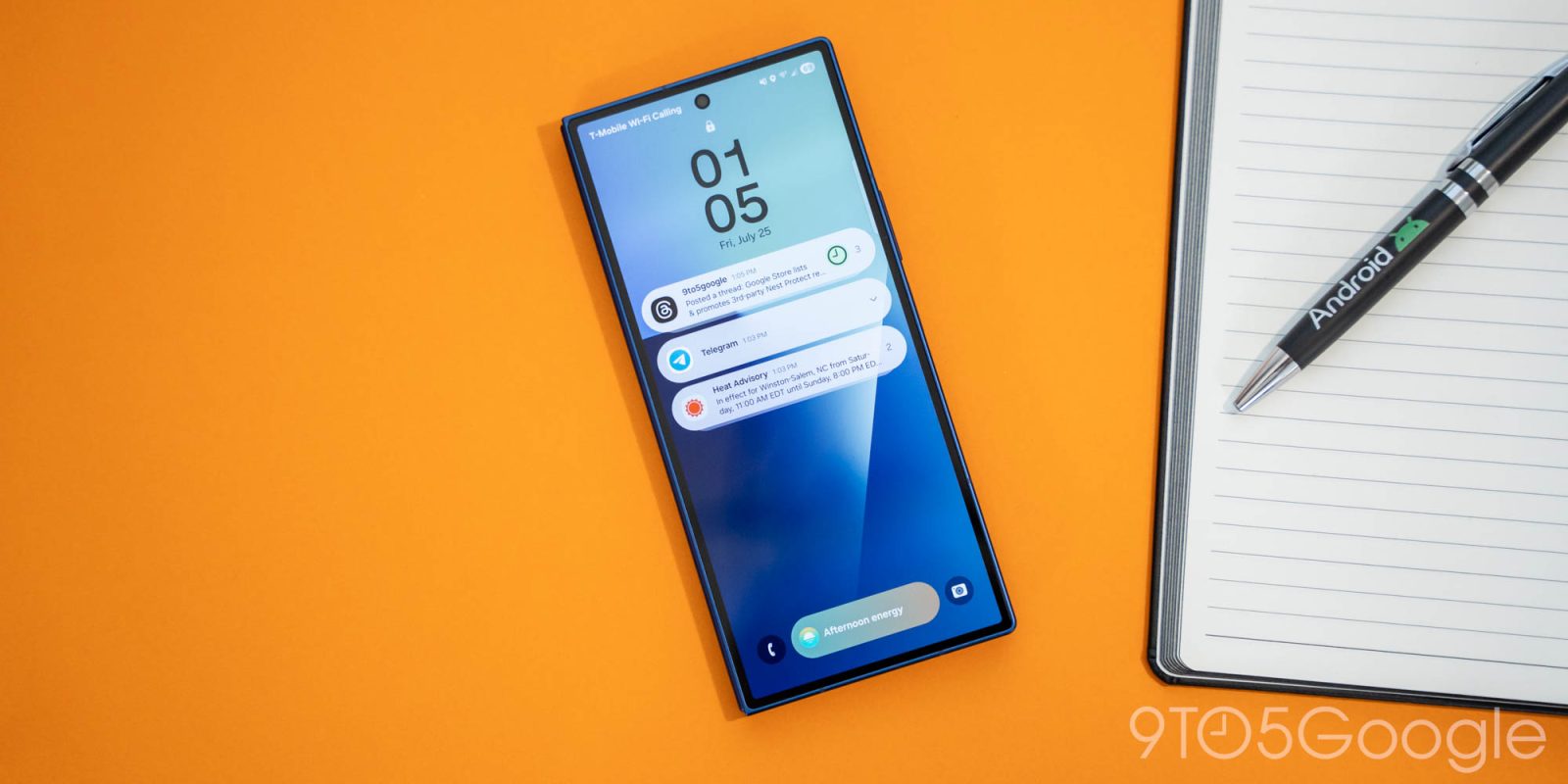
In my switch to the Galaxy Z Fold 7 as my main phone in recent months, there’s just one thing that continues to annoy me. Samsung seemingly feels the need to ruin Android notifications, and it’s the most bizarre self-sabotage.


This issue of 9to5Google Weekender is a part of 9to5Google’s rebooted newsletter that highlights the biggest Google stories with added commentary and other tidbits. Sign up here to get it delivered to your inbox early!


Notifications on Android are one of the platform’s main highlights, especially compared to iOS where notifications are simply bad – I will not be taking arguments on that today.

But, for some reason, Samsung is actively choosing to sabotage some of the best parts of Android notifications, and there are several examples.

Advertisement – scroll for more content

The most recent one I was reminded of is that, by default, Samsung turns off the ability to snooze notifications. On Pixel phones and many other Android phones, there’s a little alarm clock button to the bottom right of any notification which, when pressed, reveals a menu with preset times. Tapping any of those will dismiss the notification and resurface it at a later time. It’s super useful! But, for reasons I can’t fathom, Samsung disables that by default.

Similarly, Samsung disables Android’s notification categories by default. This feature allows users to turn off select notifications from an app based on how the app defines that notification. So, instead of an all or nothing approach, you can choose what you get. One example of how this can be used is with Instagram. Don’t want to get notified of comments, likes, followers, etc, but still get notified when a message arrives? You can do that! But, again for reasons I don’t understand, Samsung doesn’t let users do that by default. Instead, they’re left to dig through Settings to turn it back on.

There’s also the whole notification history debacle.

I’ve said my piece on how Android OEMs, especially Samsung, have thrown this feature under the bus. Samsung not only makes you dig through multiple Settings menus to find notification history, but the feature is also completely broken. If you tap on an old notification, it just opens the app instead of the actual contents, whereas notification history on Google Pixel (i.e. on Android before Samsung messes with it) just treats the historical notification as a fresh one, opening up the contents as you’d expect.

The list of problems goes on from there, really. Another example is Samsung having recently ruined the usefulness of lockscreen notifications by default, with users needing to go into their Settings just to make notifications visible again.

Personally, I just don’t get it.

Android presents these awesome, useful tools for managing notifications, and Samsung just says “oh our users don’t need those” and turns them off. I’m glad they still exist in the software, but the very annoying truth is that most Samsung Galaxy users have absolutely no idea these features exist. As such, they’re not asking for this change to be made.

What do you think? Is Samsung ruining Android notifications? Do you use these features? Did you know they existed? Let’s discuss!


This Week’s Top Stories

Wear OS 6 rollout & Pixel Watch 4 reviews

Google has officially released the Pixel Watch 4 series, and our reviews have arrived. In short, this is a bigger upgrade than you think, and one worth checking out. One of the big highlights, software, is also already on its way to prior generations, with Wear OS 6 now rolling out to Pixel Watch 2 and Pixel Watch 3.

More Top Stories


From the rest of 9to5

9to5Mac: Watch Apple’s ‘design is how it works’ video right here

9to5Toys: Nintendo just revealed three new SNES games for Switch Online

Electrek: Tesla pushes Tron: Ares ad inside its cars, upsetting owners


Follow Ben: Twitter/XThreads, Bluesky, and Instagram

FTC: We use income earning auto affiliate links. More.


Source link