Healthcare is awash in single-use plastics. In U.S. healthcare facilities alone, more than 2,800 tons of plastic packaging and products are thrown out every day.
Few people are more aware of this than Eddie Yu. Early in the pandemic, Yu founded a company that made disposable masks. One day, his niece was with him while he was sorting recycling, and she asked him whether his mask was also recyclable.
“I told her that actually we can’t recycle the mask,” he told TechCrunch. “She just interrupted me and said, ‘Oh, then you make a lot of trash every day.’”
The little girl’s words stuck with Yu, and after selling the mask company in 2021, he set out to make amends.
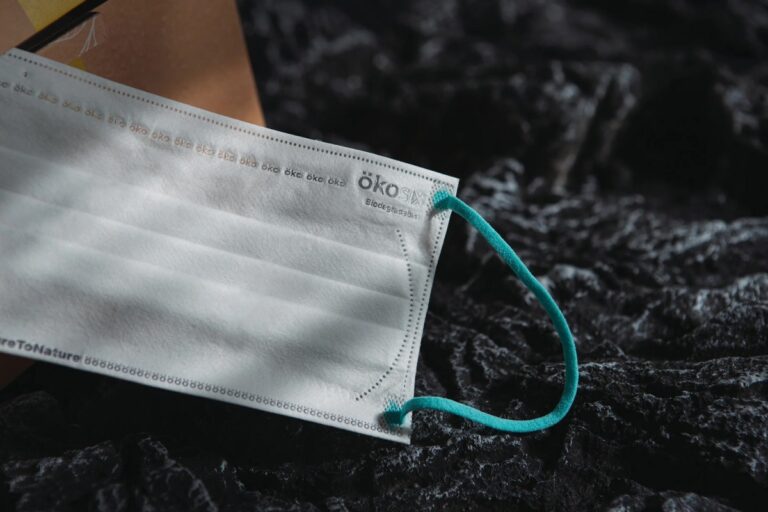
In an effort to tame healthcare’s single use plastic problem, Yu’s new company, Okosix, has developed a new bio-based, biodegradable polymer. Okosix is part of Startup Battlefield, and it will be presenting at TechCrunch Disrupt later this month in San Francisco.
Okosix blends various compounds including cellulose, chitosan derived from crustacean shells, wax, and a proprietary material. The result is cheaper than polylactic acid (PLA), a widely used biodegradable plastic, with functionality that is “the same or even better than PLA,” Yu said.
Among plastics, the term “biodegradability” is often misused, Yu said. Some require very specific conditions to decompose, while others simply fall apart into micro- or nanoplastics.
Techcrunch event
San Francisco | October 27-29, 2025
“We’ve got international certifications to prove that the material is completely gone in six months,” Yu said.
Okosix is starting with face masks, but it plans to also make surgical gowns, diapers, and sanitary napkins, Yu said. “We want to use a safe material, non-plastic, to replace fossil plastics for disposable products.”
Though the company has yet to perform a formal lifecycle analysis, Yu said that Okosix’s material should have a carbon footprint that’s 90% lower than that of polypropylene, a widely-used single-use plastic.
Okosix sells its material to third parties, which then turn it into various products. “At the moment, our business model is like Gore-tex,” Yu said. “We don’t make the finished products, but we make the layer, we make the raw materials, and then we work with companies like 3M.” He added that branding could become a significant part of the business, similar to Gore-tex.
The startup has raised $2.3 million, including investments from the founders and other angel investors.
Hear more from Okosix and dozens of other startups firsthand, participate in valuable workshops, and make lasting connections at this year’s Disrupt, taking place October 27 to 29 in San Francisco.
A good webcam makes a big difference whether you’re jumping on work calls, streaming gameplay or catching up with friends across the country. Built-in laptop cameras often fall short, so investing in one of the best webcams gives you sharper video, better colors and features like background control or low-light correction. The market is full of options at different prices, which makes picking the right one tricky. Some focus on 4K resolution while others prioritize smooth frame rates or strong microphones. This guide rounds up the best webcams you can buy right now so you can find one that matches your setup and needs.
While some newer computers have 1080p webcams, most built-in cameras have a resolution of 720p, so you’ll want to look for an external webcam that has a higher resolution. FHD webcams will give you better video quality; ideally, you’re looking for something that can handle 1080p at 60fps or 30fps. If you’re considering a cheap 720p webcam, make sure to get one that supports at least 30fps (most will) or, even better, 60fps. However, if your primary concern is better picture quality during video calls, 1080p is the way to go.
Some webcams can shoot in 4K, but that’s overkill for most people. Not to mention most video conferencing services like Zoom, Google Meet and Skype don’t even support 4K video. When it comes to streaming, Twitch maxes out at 1080p video, but YouTube added 4K live streaming back in 2016. Ultimately, with 4K webcam shots having such limited use, most people can get by with a solid 1080p camera.
Field of view (FOV) controls how much can fit in the frame when you’re recording. Most webcams I tested had a default field of view of around 78 degrees, which captured me and enough of my background to prove that I really need to organize my home office. On cheaper webcams you’ll usually see narrower fields of view (around 60 degrees), and those aren’t necessarily bad. They won’t show as much of your background, but that also means you won’t be able to squeeze as many friends or family members into frame when you’re having Zoom birthday parties. On the flip side, more expensive webcams may let you adjust the field of view to be even wider than average, and some even offer features like digital zoom.
Autofocus and other “auto” features
Webcams with autofocus will keep the image quality sharp without much work on your part. You should be able to move around, step back and forth, and remain in focus the whole time. Some standalone webcam models let you manually adjust focus, too, if you have specific needs. Devices with fixed focus are less convenient, but they tend to be more affordable.
In the same vein is auto framing, a feature that some high-end webcams now offer. Similarly to Apple’s Center Stage feature, the camera automatically adjusts to keep you in the center of the frame even as you move around. This used to be a feature only available on the most premium webcams, but now you can find it on sub-$200 devices.
You’ll also see other “auto” features listed in webcam specs, most notably auto light correction. This will adjust the camera’s settings to make up for a dimly lit room. If you don’t have bright lights, or often take calls in places where you can’t control the lighting, this feature will be valuable. Alternatively, you might consider using your mirrorless camera as a high-quality webcam solution, taking all of the benefits and features with you (albeit in a cumbersome package).
Microphones
Most webcams have built-in microphones that, depending on your setup, might end up being closer to you than your computer’s own mics. Check to see if the model you’re considering has mono or stereo mics, as the latter is better. Some even use noise-reduction technology to keep your voice loud and clear. While audiophiles and streamers will want to invest in a standalone microphone, most others can get by using a webcam’s built-in mic.
Design
There aren’t a ton of fascinating breakthroughs when it comes to external webcam design. Most are round or rectangular devices that clip onto a monitor or your laptop screen. Some have the ability to swivel or screw onto a tripod stand and others can simply sit on your desk beside your computer. But unless you really like having people stare up your nose, the latter isn’t ideal. We recommend clipping your webcam to your monitor and ensuring that it’s at or slightly above eye level.
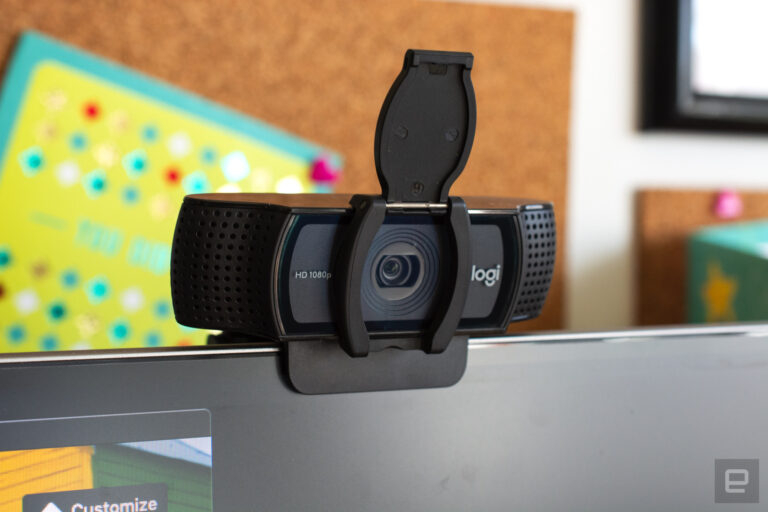
A few webcams go above and beyond by adding hardware extras like built-in lights and lens covers, too. The former can help you stand out in a dark room, while the latter makes it so hackers can’t view you through your webcam without your knowledge.
Price
Most external webcams that are just good enough to be a step up from your computer’s built-in camera cost between $60 and $150. If the webcam has the same resolution as the internal one on your laptop, you should look out for other specs like auto light correction, a wider field of view or an extra-long connecting cable that can provide a step-up in quality or ease of use.
Spending $150 or more means you might get advanced features that tend to be present in a pro webcam like 4K resolution, vertical and horizontal recording options, stereo mics, customizable video settings and more. But unless you’re spending hours on video calls each day or streaming multiple times each week, you can settle on a budget webcam and safely skip most of those high-end options.
How we test webcams
We primarily test webcams by putting them through as much real-world use as possible. We examine their design, how flexible they are and how easy they are to reposition, and make note of how heavy they are and if that affects their ability to stay put while sitting on top of a screen. We use each webcam for at least a week straight as our primary camera for all video chats, and we make sure to use the device in different lighting environments to test low-light performance. We also use any built-in microphones as our primary audio inputs on video calls as well. Finally, although most of these webcams are plug-and-play, we test out any proprietary software that’s intended to work with each webcam, tweaking things like field of view, video resolution and effects, and using any special features like Show Mode on Logitech webcams.
Others webcams we tested
Logitech C920s Pro HD
Our previous top pick, the Logitech C920s Pro HD webcam remains a solid option for those with less than $100 to spend and really only need a basic 1080p camera to upgrade their setup, or something affordable to make them look better on those inevitable Zoom calls. It has a 78-degree field of view, decent microphones and handy privacy shutter built in. The Brio 500 took the top spot away from this model thanks to its advanced light correction, auto-framing and Show Mode.
Webcam FAQs
Should I get a 4K or 1080p webcam?
It depends on how you plan to use it. A 1080p webcam is more than enough for most video calls, online classes and casual streaming. The picture looks clear, loads quickly and works well even on slower internet connections.
A 4K webcam makes sense if you want sharper detail, especially for content creation, professional streaming or recordings you plan to upload. The extra resolution also helps if you crop or zoom in during a call without losing much quality. Keep in mind that 4K requires more bandwidth and not every platform supports it, so think about whether your setup and audience will benefit before spending more.
Georgie Peru contributed to this report.
This article originally appeared on Engadget at https://www.engadget.com/computing/accessories/best-webcams-123047068.html?src=rss
Gemini for Home is the umbrella term for Google’s renewed smart home effort with several distinct aspects: app, camera, and voice assistant. From what the company has shared so far, here’s when Gemini for Home is rolling out.
The redesigned Google Home app with three tabs in the bottom bar is rolling out globally right now. Make sure you’re on version 4.0 (which brings a new homescreen icon) on Android and iOS. This is a server-side update.
The Ask Home search/chat experience in the Google Home app is currently available in the following countries:
Advertisement – scroll for more content
United States (English)
Canada (English and French)
United Kingdom (English)
Ireland (English)
Australia (English)
New Zealand (English)
These features are available to all (free) users:
Quick search: You can now quickly search for devices and automations right from the search bar. As you type, results and relevant suggestions will appear instantly.
Simple device queries: You can now ask questions about your devices. Simply say, “Which lights are on?” or “Is the front door locked?”
Real-time device control: You can now give simple commands like, “Close all blinds,” and it will instantly follow through.
Functionality that requires Google Home Premium Standard:
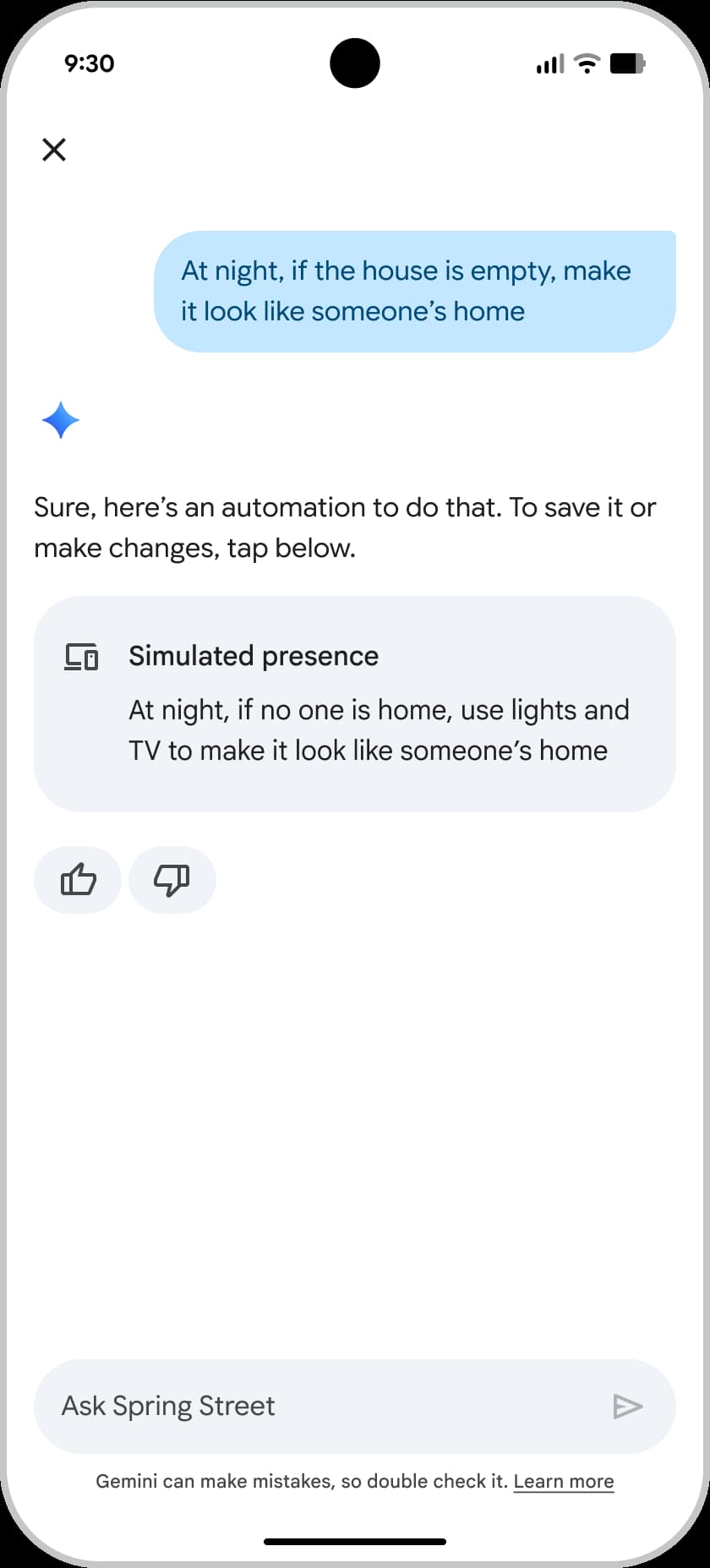
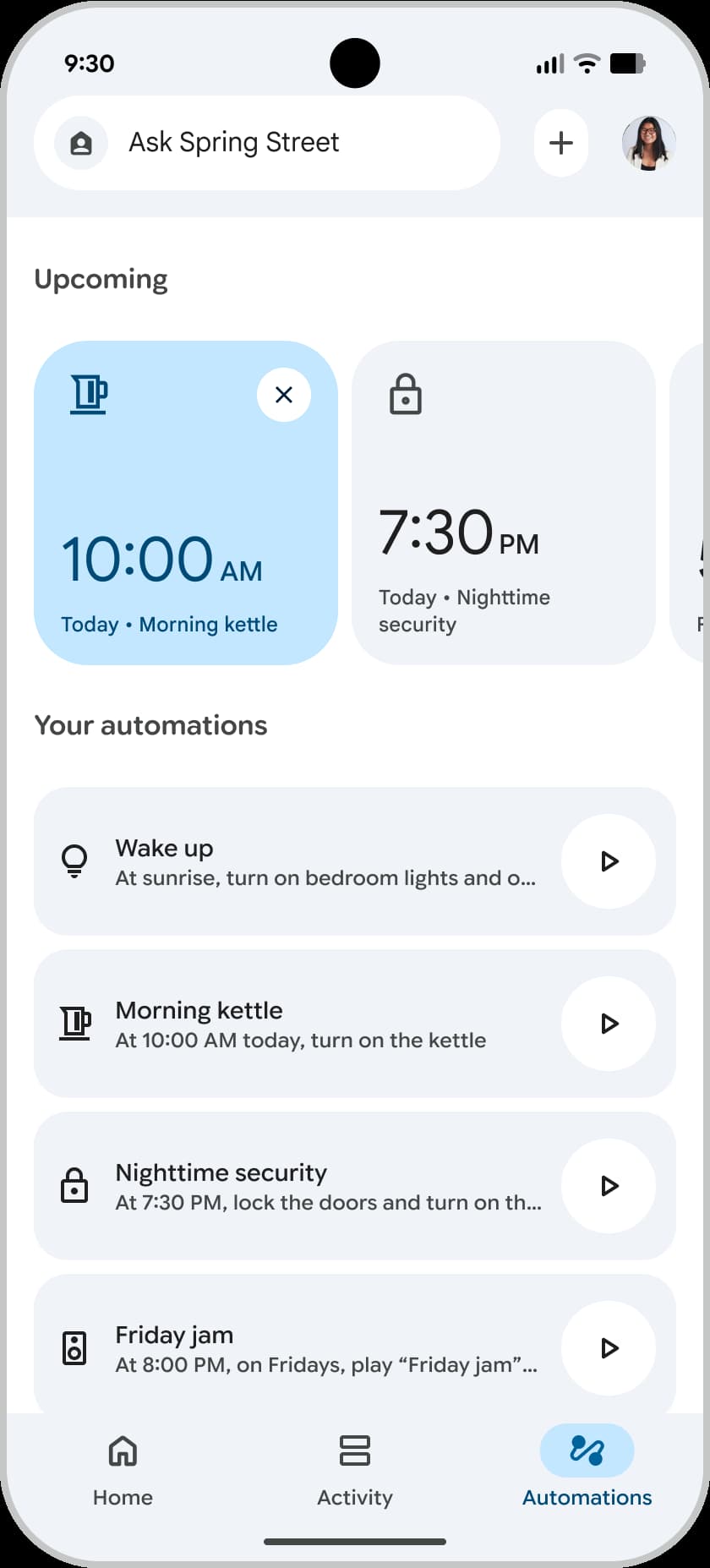
Automation creation: You can now create automations using natural language in Ask Home. You can also access Help me create in the Automations tab of the Google Home app to create automations.
Recurring automations: “Turn off all lights whenever we are away.”
One-time automations: “Later this evening at 7 PM, make the living room warm and play our favorite music.”
Saved information: You can have Ask Home remember things about you or your household, such as your favorite color, to personalize your experience.
Requires Google Home Premium Advanced:
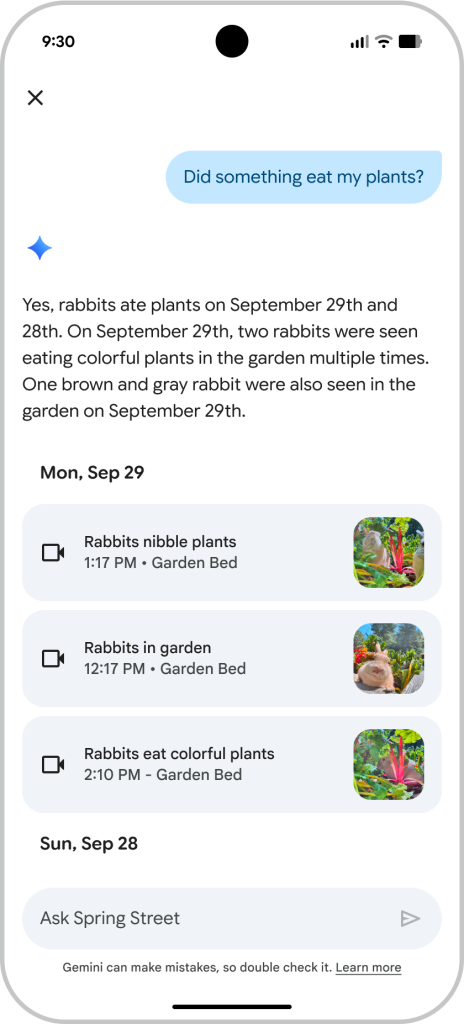
AI descriptions and AI notifications: Your camera events will now have detailed captions. Instead of just “person” or “package,” the captions will tell you more about what’s happening in the clip. You’ll also get these detailed descriptions in your camera notifications.
Search video history: Find specific events recorded by your cameras by asking questions like “Did the dog go outside today?”
Home Brief: Receive a daily summary each evening of the most important events captured by your cameras.
This is rolling out as a software update that “could take several days to reach all eligible subscribers.” Gemini for Home camera features include:
AI descriptions, which process recorded camera events to provide more detailed short and long descriptions of what happened.
For example, instead of the usual “activity or animal detected” label, the AI description may be ”the dog is digging in the garden.”
AI notifications, which provide short versions of AI descriptions within camera event notifications, making it easier to see what happened at a glance.
Home Brief, which provides an overview of what happened at home each day.
Ask Home video history search, which allows you to use natural language to search for a specific camera event.
Beginning October 28, 2025
The Gemini for Home voice assistant, or the Google Assistant replacement, will begin rolling out for users in the US that join the “Early access” program starting October 28.
Note: Early access just applies to Gemini for Home (AI) features. The existing Public Preview program remains available to test the “latest Google Home app features .”
The instructions Google provided are below, but users with the redesigned app are just seeing “Public Preview,” with the switch immediately toggling off after enabling. It’s presumably still rolling out.
Open the Google Home app.
At the top right, tap your Profile picture or Initial.
Tap Home settings > Early Access.
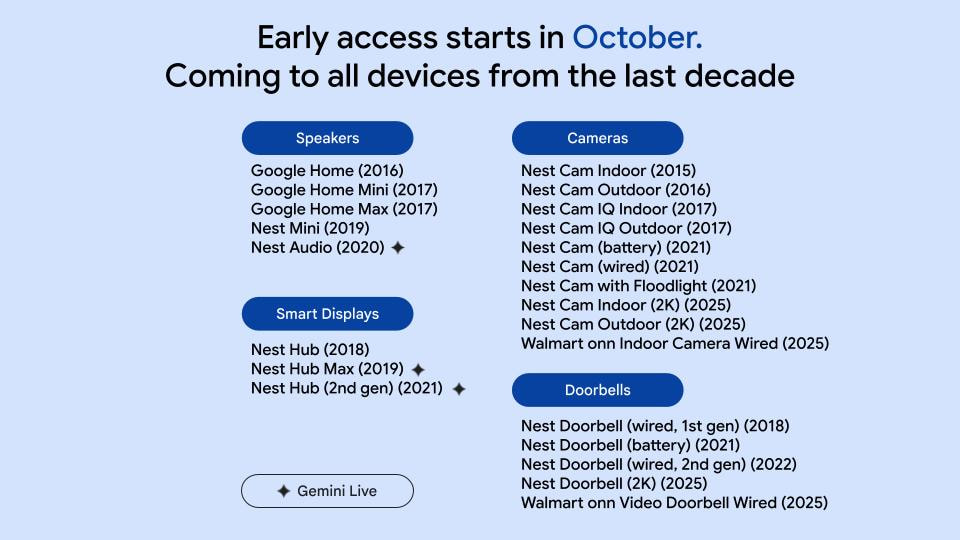
The following devices will receive Gemini, but only the last four devices on this list will receive Gemini Live (which requires Google Home Premium Standard):
Google Home
Google Home Mini (1st gen)
Google Home Max
Google Nest Hub (1st gen)
Google Nest Wifi point
Google Nest Mini (2nd gen)
Google Nest Hub Max
Google Nest Audio
Google Nest Hub (2nd gen)
Early 2026
The Gemini for Home camera features for the new New Cams and Doorbell mentioned above are rolling out to “other supported regions in early 2026.” From where the cameras are sold, that should be: Austria, Belgium, Denmark, Finland, France, Germany, Italy, Japan, Netherlands, Norway, Spain, Sweden, and Switzerland.
Similarly, the plan is to expand the Gemini for Home voice assistant “to more countries in early 2026.”
Spring/March 2026
In most countries, the company says the Google Home Speaker is coming in “Spring 2026.” The Australian Google Store mentions March 2026.
FTC: We use income earning auto affiliate links.More.
A stretch of unseasonably warm temperatures that has led to early October feeling less like fall and more like summer will continue early this week in Massachusetts, before a cold front brings much-needed rainfall.
Monday will get off to a mild start, with temperatures in the 50s and 60s, a layer of fog and some low clouds. The fog and low clouds may linger into late morning, but temperatures are expected to reach the low to mid-80s once they drift away.
If the fog and clouds stick around though, temperatures could be “quite a bit cooler” than expected, National Weather Service forecasters wrote.
More clouds and fog are expected Monday night.
“With low clouds and areas of mist/fog making it further northward for Monday night, similar forecast concerns exist regarding how warm temperatures may get” on Tuesday, forecasters wrote.
Tuesday should be a little cooler thanks to that added cloud cover, with temperatures in the 70s to low 80s.
A cold front is expected to move into the state on Tuesday night into Wednesday morning, bringing “much-needed rainfall,” forecasters wrote. The amount of precipitable water in the air suggests a period of steady light to moderate rain, with a rumble of thunder possible.
“Rain amounts are still a little uncertain, but [chances] of 24-hour rain accumulations over a half inch or more continue to increase,” forecasters wrote.
A strong high-pressure system is expected to build in the wake of the front Wednesday night, leading to dry conditions and decreasing winds Thursday and Friday.
Temperatures will decline as well, with highs expected to be in the mid-50s to around 60 on Thursday, which could also bring the first night with frosty temperatures in the 30s in many parts of the state.
Friday will be slightly warmer, with highs in the low to mid 60s.
Looking ahead, a slow-moving coastal low-pressure system is likely to move in later Saturday and into Sunday.
“There is time to assess this, but if this low pressure does indeed materialize and approaches from the south, we could have a few days of overcast, cooler temperatures, enhanced east breezes and some rains,” forecasters wrote.
If you purchase a product or register for an account through a link on our site, we may receive compensation. By using this site, you consent to our User Agreement and agree that your clicks, interactions, and personal information may be collected, recorded, and/or stored by us and social media and other third-party partners in accordance with our Privacy Policy.
Dr. Tom Kelly is a trauma surgeon, and everywhere, he sees doctors drowning in administrative work. He wanted change, so he set out to build it.
“We wanted to build an AI care partner that would stand alongside clinicians and take care of the admin so that individual providers, like me, can feel empowered to deliver the care which we dedicated our lives to,” he told TechCrunch.
Dr. Kelly teamed up with Waleed Mussa, with whom he had worked at a previous startup, and founded Heidi Health in 2021. The company began launching products in early 2024.
In just 18 months, he said, the company has returned more than “18 million hours to frontline healthcare providers from more than 70 million patient visits in 116 countries.”
The product, as promised, is an AI medical scribe that takes care of all the admin work that hassles doctors. It can transcribe and dictate notes, generate personalized patient summaries, and even track tasks so doctors no longer have a need for sticky notes.
Heidi both built its own AI model and builds on top of other models, such as Gemini. “This model agnostic approach means that we can optimize our accuracy, latency, and cost,” he said.
On Monday, the company announced a $65 million Series B led by Steve Cohen’s Point72. It also announced a new tool: an AI agent that calls patients on behalf of the doctor. The former Chief Medical Officer at Microsoft, Dr. Simon Kos, is also coming on board, along with Plaid’s head of revenue, Paul Williamson.
Techcrunch event
San Francisco | October 27-29, 2025
The company has raised $96.6 million to date. Others in the round include Goodwater Capital, Headline, Blackbird VC, LG Technology Ventures, and Alumni Ventures.
“They had seen all the scribes before,” Dr. Kelly said of Point72. “They’d never seen product adoption and usage metrics like they’d seen in Heidi. They also loved that we were obsessed about the end user experience, because they saw most of our competitors were just doing top-down sales.”
The fresh capital will be used to help with product development.
Dr. Kelly hopes that giving doctors more access to AI tools will expand the capabilities of clinicians and remove the “drudgery” of their work.
He said most of the conversations in the medical world right now are shaped by what is happening in developed countries, “but imagine a world where any healthcare provider in the world can use Heidi to increase their clinical capacity, where they can practice in a war zone, or a refugee camp, or a region hit by climate change or simply an underserved community,” he continued. “Heidi can help them reach more patients and deliver better health care results.”
AI is transforming the health tech. Others in the medical scribe space, in particular, include DeepScribe, Ambiance Healthcare, and Abridge.
Heidi said it works with more than 2 million clinicians a week, ranging from hospitals to individual practices. It has a free version of the product with paid features, which Dr. Kelly believes has been a good lure for new customers.
He said AI is understandably going to change everything in healthcare. But at its core, humanity is still very essential, especially when it comes to maintaining and building trust.
“It’s about doubling the world’s health care capacity. That’s the true promise of AI,” he said. “We want to bring it about.”
OpenAI and Jony Ive could still have some serious loose ends to tie up before releasing their highly anticipated AI device. According to a Financial Times report, the partnership is still struggling with some “technical issues” that could ultimately end up pushing back the device’s release date, which is expected to be sometime in 2026.
One of those lingering dilemmas involves figuring out the AI assistant’s voice and mannerisms, according to FT‘s sources. The AI device is meant to be “a friend who’s a computer who isn’t your weird AI girlfriend,” according to a FT source who was briefed on the plans. Beyond landing on a personality, OpenAI and Ive are still figuring out potential privacy concerns stemming from a device that’s always listening. On top of that, the budget could reportedly be a challenge due to the increased computing power necessary to run these mass-produced AI devices.
Outside these latest struggles, we still know very little about the upcoming product. Sam Altman, OpenAI’s CEO, reportedly offered some clues to employees that it could be pocket-sized, aware of its environment and sans display. There are still plenty of questions about what OpenAI’s first hardware project will amount to, but the company could be exercising more caution since similar devices, like the Humane AI Pin, were discontinued after failing to deliver on sales.
Following new announcements this week, the future of Google Home is brighter than ever, and that’s exciting.
This issue of 9to5Google Weekender is a part of 9to5Google’s rebooted newsletter that highlights the biggest Google stories with added commentary and other tidbits. Sign up here to get it delivered to your inbox early!
To quickly recap this week’s announcements, Google Home is getting a revamp centered around Gemini. The Google Home app itself is rolling out a redesign that simplifies the overall look and functionality of the app, Google Assistant is being replaced by Gemini on all of Google’s smart speakers dating back to the original Google Home, and Gemini will supercharge Nest cameras with improved video search, notifications, and more.
On the surface level, there’s a lot to be excited about, but a deeper look reveals a few things that I consider even more exciting.
Advertisement – scroll for more content
Firstly, there’s the precedent Google is setting for the smart home. Updating all of its smart speakers and cameras from the past decade sets the tone for all future hardware, and really fights against the whole “Google Graveyard” schtick. It’s a refreshing level of commitment that we don’t see often enough in tech, and combined with Google’s 7-year update policy for Pixel phones, I’d argue that Google is making the most promises in this regard.
More exciting to me personally is the expansion of hardware Google is making.
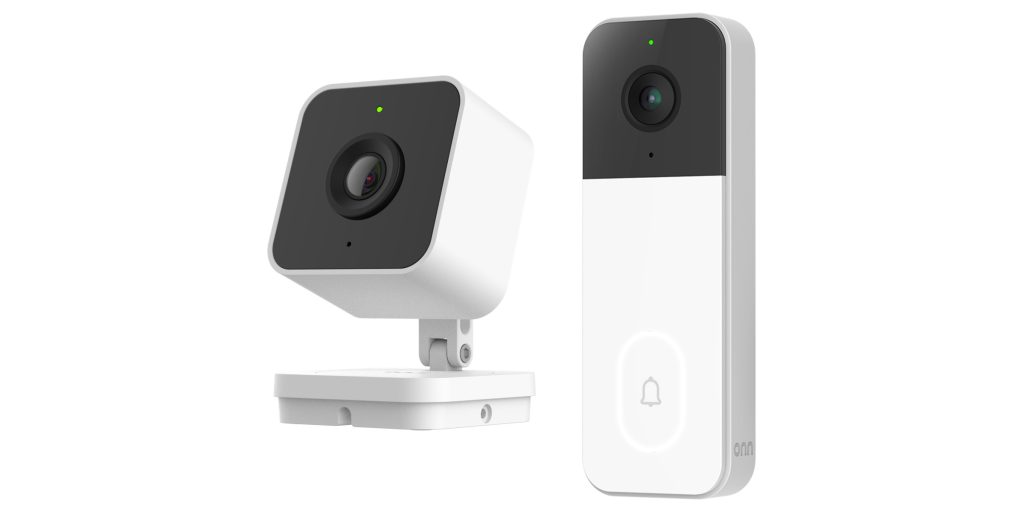
The Nest catalog has always felt a little restrictive to me, with mostly single-purpose hardware that’s very expensive compared to a sea of affordable alternatives. That’s why I was thrilled to see Google team up with Walmart to build affordable new cameras that start at just $23, literally a quarter of the price of Google’s cheapest Nest camera. You’ve always been able to see other third-party cameras in the Home app, but not at the same level of integration as Google is now doing with Walmart. I can’t wait to see other brands jump on board here and continue to expand the catalog. The other benefit here is on security. Since Google is handling the video storage and processing, there’s far less of a concern around “how are these so cheap?” and cutting corners.
Then, there’s just the level of functional improvement.
The past few years have been “AI this, AI that, AI everything,” but Google is proving that it actually knows how to use AI with these latest announcements. The natural language understanding of Gemini paired with the wealth of data Google has is building some really cool integrations. Looking at cameras again, Gemini is making it possible for users to get tailored, descriptive notifications while also being able to have the AI answer questions by using the recorded footage.
That’s awesome.
Outside of cameras, Gemini is also poised to fix a lot of the problems that have come from a crumbling Assistant. Smart home commands work much better on Gemini compared to Assistant, and they’re also going to be able to handle more complex actions. If it sticks the landing, it’ll be awesome, and it’ll also be a big selling point for that upcoming Google Home Speaker.
In a lot of ways, Gemini is delivering on what Google has been promising for literally a decade. Looking back at 2016’s Google I/O presentation, where Google Home and Assistant were shown off for the first time, a lot of that initial vision is finally being paid off now.
Of course, much of this is in “Early Access” for now, but I’m impressed. Google has laid out a vision for the smart home that’s compelling and powerful, and I can’t wait to see where it leads.
What do you think?
This Week’s Top Stories
Amazon’s smart home refresh, and a confusing Fire TV replacement
Right before Google’s announcement, Amazon held an event to announce new smart home hardware including Ring cameras, new Fire TVs, and smart speakers, alongside updates to Alexa+.
In the Fire TV world, Amazon is replacing its Android-based platform with an in-house Vega OS. That sounds straightforward enough but, because it requires all-new apps, Amazon is making all non-native Fire TV apps stream the Android version from the cloud so people can still use them. That sounds… bad??
NBC and YouTube TV fight, but everyone wins
As their contract came to an end, NBC and YouTube TV got into a pretty vocal back-and-forth this week, but the end of the story is that everything is all good. YouTube TV will continue to carry NBC content, prices won’t change, and Peacock is coming to YouTube Primetime Channels too.
Springfield Superintendent Dr. Sonia E. Dinnall speaks to the students graduating at the Summer School Commencement Ceremony for the Class of 2025 in Symphony Hall. August 12, 2025. (Douglas Hook / The Republican)Douglas Hook
SPRINGFIELD — When they were seniors, 56% of the city’s class of 2024 said they planned to go to college. By September 2024, 39% of the recent graduates started their first college classes.
The numbers don’t get better. This September, 28% of the 2024 graduates are continuing to their second year of college.
If you purchase a product or register for an account through a link on our site, we may receive compensation. By using this site, you consent to our User Agreement and agree that your clicks, interactions, and personal information may be collected, recorded, and/or stored by us and social media and other third-party partners in accordance with our Privacy Policy.
Police say they have arrested a suspect allegedly connected to multiple online threats that led TikTok to evacuate its headquarters near Los Angeles on Friday.
A press release from the Culver City Police Department says that TikTok employees reported receiving multiple threats, across various social media platforms, from 33-year-old Hawthorne resident Joseph Mayuyo. After an additional message threatened TikTok’s Culver City headquarters, police say company security evacuated the office “out of an abundance of caution.”
Police then investigated Mayuyo’s home, according to the press release. During the investigation, he allegedly posted additional threatening statements, including one declaring that he would not be taken alive. Detectives obtained search and arrest warrants, and they negotiated with Mayuyo for 90 minutes before he voluntarily exited his home and was taken into custody, the police department says.
Business Insider reports that one TikTok employee described the threats as “really scary,” while another was concerned that they seemed to specifically target the e-commerce department.
Mayuyo’s X account has reportedly been suspended for violating the platform’s hateful content policy. A Medium account under his name published a post in July criticizing TikTokShop USA as a “scam.”
TechCrunch has reached out to TikTok for comment. In the press release, the police department praises TikTok’s security team “for their quick action, collaboration, and professionalism throughout this case.”
This arrest comes as TikTok’s U.S. operations are being spun out from Chinese owner ByteDance as a new joint venture with a new board of directors. President Donald Trump, who has been talking and posting about the deal for many months, recently signed an executive order approving the sale.
Maybe you’re not looking to snag an iPad, a robot vacuum or a VR headset this Amazon Prime Day because you’re set with what you already have. Instead, though, consider picking up a few discounted “essential” gadgets, or really, devices you don’t want to be left without in a pinch. Charging gear falls into this camp, and Anker makes some of our favorite power banks, cables, wireless chargers and more.
A bunch of Anker’s gear is on sale for October Prime Day, making now a great time to stock up. Personally, I always end up getting an extra charging cable or surge protector for my house, or I take stock of the gifts I’ll need over the next couple of months and pick up a power brick while they’re deeply discounted. Here, we’ve collected all of the best October Prime Day deals on Anker devices and other charging accessories so you don’t have to go searching for them.
Anker Prime Day deals: Power banks
Power banks are not as straightforward as you might think. They come in all shapes, sizes and capacities and can have extra features like magnetic alignment, built-in kickstands, extra ports and more.
It’s worth considering how you’ll use a power bank before you decide on the right one to buy. Smartphones don’t need huge-capacity bricks to power up a couple of times over; a 5K or 10K portable charger should be plenty if that’s all you’re looking to support. If you want a more versatile accessory that can charge a tablet, laptop or gaming handheld, consider a brick with a higher capacity — and more ports so you can charge multiple devices simultaneously.
Anker Prime Day deals: Wireless chargers
A good wireless charger can lighten your cable load. While wired charging remains faster and more efficient, wireless chargers can clean up your space by eliminating a few of those cables that constantly trip you up.
We recommend thinking about where you’ll use a wireless charger before buying one. Those outfitting a home office with new tech may want a wireless charging stand that puts their phone in an upright position that’s easier to see while it’s powering up, while those who want a wireless charger for their nightstand might prefer a lay-flat design or a power station that can charge a smartphone, smartwatch and pair of earbuds all at once.
Anker Prime Day deals: Charging gear
Plenty of other charging gear is on sale for Prime Day. It’s never a bad idea to pick up a few 30W USB-C adapters so you always have what you need to reliably power up your phone. Same goes for extra USB-C (or USB-A) cables that can live in your car, in your office at work or by the couch.



![When is Gemini for Home rolling out: Schedule, countries [Updated]](https://eyeobserver.online/wp-content/uploads/2025/10/google-home-fi-02-03-768x402.png "When is Gemini for Home rolling out: Schedule, countries [Updated]")