
Home Blog Page 92

Galaxy Z TriFold suffers horrific defeat in durability test

0


Unlike its less impressive successor, the Galaxy Z TriFold just can’t stand up to the same sort of bend abuse the Galaxy Z Fold 7 can. In a heartbreaking but familiar durability test to push the phone to its limits, the Galaxy Z TriFold simply gives up.

If it weren’t for some of the impressive results produced by Samsung’s last foldable device, there wouldn’t be much to expect out of the Galaxy Z TriFold in regard to its limits. Foldables are breakable, and the mere tolerances of these devices suggest they should be as durable as cardstock. The Galaxy Z Fold 7 made a point that foldables can be strong; the TriFold, not so much.

During a traditional durability test video posted by JerryRigEverything, the Galaxy Z TriFold is put through the usual paces. That includes scratch, fire, dirt, and bend resistance. The first two yield no surprises, and shockingly, foldable glass is still soft.

The latter two, though, are where things get interesting. It seems the Galaxy Z TriFold is much less resistant to pocket sand, and even though the granules of dirt used in the test fall short of microscopic, the TriFold doesn’t appear to handle it well. Crunching and grinding are heard from the hinges as the phone is opened in its entirety and closed again.

Advertisement – scroll for more content

As for the bend test, this is the first Galaxy device to simply give up after a quick bend in the wrong direction. With what appears to be a reasonable amount of force, the TriFold’s pixels tear and go dark. The bottom portion of the right hinge snaps. The phone likely doesn’t truly die in the sense that it’s beyond recovering data, but it certainly would cost more to repair the screen than anyone would be okay with.

The Galaxy Z Fold 7 gets the advantage in this case, considering it was able to withstand a very similar bend test with fewer wounds.

Previous Galaxy Z TriFold durability tests have already surfaced before official release, focusing on hinge cycles and longevity. Those tests revealed the Galaxy Z TriFold can withstand upwards of 150,000 full folds without suffering any negative defects. Samsung claims the device can last up to 200,000 folds without breaking, which may still stand true.

There are no claims specifically regarding outward pressure applied to the device opposite the direction of travel. In that situation, the TriFold folds in on itself – in the wrong way. At least the battery didn’t puncture in the process. However, the new pull tab system uncovered by the channel showcases a new hypothetical where the thin batteries begin to bend dangerously when removed.

The Galaxy Z TriFold will be available from Samsung sometime in early 2026.

FTC: We use income earning auto affiliate links. More.



Source link

‘No one should go hungry;’ Springfield’s Open Pantry offers free Christmas dinner to more than 500

0


SPRINGFIELD – The annual free community Christmas dinner would not be quite as merry or bright without Michael Yacovone and his DJ skills.

As people sat around tables enjoying plates of beef stroganoff, carrots and pie Thursday, Yacovone provided background music — spinning traditional Christmas tunes, some Spanish classics and anything anyone wanted to hear.

“I get a lot of requests,” he said, cueing up one of the crowd favorites, “Feliz Navidad,” which he called catchy and festive.

Keith Barnett, one of Yacovone’s fans, requested he play a few of his favorites from the rhythm and blues group “The Dells” and Ted Wizard Mills, lead singer with the soul group “Blue Magic.”

Barnett declared the dinner “delicious” and said he enjoyed the atmosphere and company. Barnett even left with a second plate for a neighbor who couldn’t make it to the dinner.

“I’m hoping to bring her something to eat. No one should go hungry in this day and age,” he said.

Christmas meals at Commerce High School for the Open Pantry
Keith Barnett talks to a volunteer as she serves him a Christmas Day meal at the High School of Commerce in Springfield. (Ed Cohen photo)Edward Cohen

No one left this Christmas dinner hungry or empty-handed. This year, volunteers delivered at least 450 meals, mostly to older people who are homebound, and served up an estimated 100 dinners at the school on State Street, said Nicole Lussier, managing director of the Open Pantry.

The organization has been holding Christmas meals for at least 42 years. While the dinners started at a different location, they’ve been served at the school on State Street for decades, she said.

The dinner itself was cooked by Partner’s Restaurant, in Agawam. Every year, the Open Pantry tries to offer something a little different. It asks regular pantry diners what might appeal to them, said Stephen Penna, chairman of the organization’s board of trustees.

Everyone is welcome at the dinner and organizers try to make it as festive as possible. Along with the DJ, a Shriners clown also volunteered, telling jokes and making balloon animals for children.

Members of Trinity United Methodist Church provided diners with a gift bag that included a towel, washcloth and hygiene items, Lussier said.

While it takes a lot of effort to provide the dinner, there was no lack of volunteers willing to give up a few hours of their holiday to make it happier for others. That help also cuts costs for the pantry, which spends some $5,000 to serve up Christmas dinner, Penna said.

“I love to give back and I’m single, retired and life is good,” said Cynthia Starzyk, of Chicopee.

With few family members close by, Starzyk, a retired speech teacher for the Springfield Public Schools, said she enjoys helping out at the meals and also volunteers for Easter and Thanksgiving.

Christmas meals at Commerce High School for the Open Pantry
Cynthia Starzyk prepares Christmas meals to go at Commerce High School on Thursday. (Ed Cohen photo)
Edward Cohen

Volunteers, many wearing Santa hats or holiday sweaters, did everything from serving dinner and pouring drinks to clearing tables and greeting guests.

“I like the welcoming you get from the people,” said Juan Rodriguez Feyjoo, one of the diners. “It is warm and comforting and shows they care for the people on the street.”

He said the volunteers bring a positive vibe to the dinner.

Andrea Rosario came to the dinner with her mother, Rosa Merced, and her three children, aged 11, 4 and 2. Sometimes they serve as volunteers, but this year they sat down and ate, since there was already plenty of help available.

Merced said she knows a lot of homeless people who show up for the meals. When one such person came in, she hugged him and called him family.

She said she is part of a group of volunteers for the Action Commission who are working to open a desperately needed women’s shelter in Springfield. Their goal is to have the shelter in operation by June or July.

Christmas meals at Commerce High School for the Open Pantry
Michael Yacovone provides holiday music at the Open Pantry’s Christmas Day dinner Thursday at Commerce High School in Springfield. (Ed Cohen photo)
Edward Cohen

Yacovone, the day’s music-maker, grew up in Springfield but now lives in East Longmeadow. He said he started playing music at the annual Open Pantry Community Services Christmas dinner at least 35 years ago, after learning about the event through his father-in-law, a long-term volunteer.

Long after splitting with his wife, Yacovone continued volunteering, setting up his equipment and entertaining at the pantry’s Easter and Thanksgiving dinners, as well as the Christmas one held at the High School of Commerce.

“I like what I do, I really enjoy it,” he said. The Christmas meal is always the easiest, he said, because the playlist is obviously holiday music. Easter and Thanksgiving take little more thought and imagination.

His effort is always well-received. Yacovone said almost every year people sing along and get up and dance. At least one couple usually amazes other diners with their skills in salsa or ballroom dancing.


Source link

The year data centers went from backend to center stage

0


There was a time when most Americans had little to no knowledge about their local data center. Long the invisible but critical backbone of the internet, server farms have rarely been a point of interest for folks outside of the tech industry, let alone an issue of particularly captivating political resonance.

Well, as of 2025, it would appear those days are officially over.

Over the past 12 months, data centers have inspired protests in dozens of states, as regional activists have sought to combat America’s ever-increasing compute buildup. Data Center Watch, an organization tracking anti-data center activism, writes that there are currently 142 different activist groups across 24 states that are organizing against data center developments.

Activists have a variety of concerns: the environmental and potential health impacts of these projects, the controversial ways in which AI is being used, and, most importantly, the fact that so many new additions to America’s power grid may be driving up local electricity bills.

Such a sudden populist uprising appears to be a natural response to an industry that has grown so quickly that it’s now showing up in people’s backyards. Indeed, as the AI industry has swelled to dizzying heights, so, too, has the cloud computing business. Recent U.S. Census Bureau data shows that, since 2021, construction spending on data centers has skyrocketed a stunning 331%. Spending on these projects totals in the hundreds of billions of dollars. So many new data centers have been proposed in recent months that many experts believe that a majority of them will not — and, indeed, could not possibly — be built.

This buildout shows no signs of slowing down in the meantime. Major tech giants — including Google, Meta, Microsoft, and Amazon — have all announced significant capital expenditure projections for the new year, a majority of which will likely go toward such projects.

New AI infrastructure isn’t just being pushed by Silicon Valley but by Washington, D.C., where the Trump administration has made artificial intelligence a central plank of its agenda. The Stargate Project, announced in January, set the stage for 2025’s massive AI infrastructure buildout by heralding a supposed “re-industrialization of the United States.”

Techcrunch event

San Francisco
|
October 13-15, 2026

In the process of scaling itself exponentially, an industry that once had little public exposure has suddenly been thrust into the limelight — and is now suffering backlash. Danny Cendejas, an activist with the nonprofit MediaJustice, has been personally involved in a number of actions against data centers, including a protest that took place in Memphis, Tennessee, earlier this year, where locals came out to decry the expansion of Colossus, a project from Elon Musk’s startup, xAI.

Cendejas told TechCrunch that he meets new people every week who express interest in organizing against a data center in their community. “I don’t think this is going to stop anytime soon,” he said. “I think it’s going to keep building, and we’re going to see more wins — more projects are going to be stopped.”

Evidence in support of Cendejas’ assessment is everywhere you look. Across the country, communities have reacted to newly announced server farms in much the same way the average person might react to the presence of a highly contagious plague. In Michigan, for instance, where developers are currently eyeing 16 different locations for potential data center construction, protesters recently descended upon the state’s capitol, saying things like: “Michiganders do not want data centers in our yards, in our communities.” Meanwhile, in Wisconsin — another development hot spot — angry locals appear to have recently dissuaded Microsoft from using their town as a headquarters for a new 244-acre data center. In Southern California, the tiny city of Imperial Valley recently filed a lawsuit to overturn its county’s approval of a data center project, expressing environmental concerns as the rationale.

The discontent surrounding these projects has gotten so intense that politicians believe it could make or break particular candidates at the ballot box. In November, it was reported that rising electricity costs — which many believe are being driven by the AI boom — could become a critical issue that determines the 2026 midterm elections.

“The whole connection to everybody’s energy bills going up — I think that’s what’s really made this an issue that is so stark for people,” Cendejas told TechCrunch. “So many of us are struggling month to month. Meanwhile, there’s this huge expansion of data centers…[People are wondering] Where is all that money coming from? How are our local governments giving away subsidies and public funds to incentivize these projects, when there’s so much need in our communities?”

In some cases, protests appear to be working and even halting (if only temporarily) planned developments. Data Center Watch claims that some $64 billion worth of developments have been blocked or delayed as the result of grassroots opposition. Cendejas is certainly a believer in the idea that organized action can halt companies in their tracks. “All this public pressure is working,” he said, noting that he could sense a “very palpable anger” around the issue.

Unsurprisingly, the tech industry is fighting back. Earlier this month, Politico reported that a relatively new trade group, the National Artificial Intelligence Association (NAIA), has been “distributing talking points to members of Congress and organizing local data center field trips to better pitch voters on their value.” Tech companies, including Meta, have been taking out ad campaigns to sell voters on the economic benefits of data centers, the outlet wrote. In short: The tech industry’s AI hopes are pegged to a compute buildout of epic proportions, so for now it’s safe to say that in 2026 the server surge will continue, as will the backlash and polarization that surround it.


Source link

How to transfer your games to the Nintendo Switch 2

0


Upgrading to the Switch 2 is a big step forward, thanks to the larger screen, new features and improved performance. But shifting to a new console naturally raises the question of what happens to all your games and save data on the one you already have. Thankfully, Nintendo has built a clear System Transfer process that lets you move your account, digital purchases, save files and other key data from your original Switch to the Switch 2. If you prepare ahead of time, you can be back to playing your favorite titles on new hardware in minutes.

We’ll walk you through everything you need to know, including what transfers, how to start the process and what to check once you’re set up.

Before you transfer: A quick checklist

Running through these steps first will save you time later:

  • Charge your original Switch and your Switch 2, and keep them near each other.

  • Connect to a stable Wi-Fi connection, as this is required to verify your Nintendo Account and manage redownloads.

  • Update your original Switch by installing the latest system software so the transfer can run without interruptions.

  • Confirm your Nintendo Account is linked, and each user you want to move is tied to a Nintendo Account.

  • Most Switch titles work on Switch 2, but a few may have issues, so it’s worth checking Nintendo’s compatibility list ahead of time.

  • Back up screenshots and videos if needed. These should transfer, but it never hurts to have your own copy.

How to start the transfer of data from your old Switch to the Switch 2

With your original Nintendo Switch to hand, navigate to System Settings, select Users then select Transfer Your User & Save Data. Pick the user profile you want to move, confirm your Nintendo Account information and follow the on-screen prompts.

Power on your Switch 2 and go through the initial setup. When the console asks if you want to transfer data from another system, select Start System Transfer. Make sure both consoles are connected to the same Wi-Fi network and remain powered on during the process.

Once the Switch 2 detects your original console, it will guide you through pairing the systems for the transfer. After the connection is established the original Switch will begin sending your user information, save data and settings.

When the transfer is complete, your new console will automatically log in using your Nintendo Account. Your digital games will appear in the Redownload section of the eShop so you can pull them onto your Switch 2 as needed.

What to do after your transfer is complete

Once everything has moved to the Switch 2, there are a few final steps that help round out the process. You can redownload your digital games from the eShop and start reinstalling your favorites. Any controllers, Joy-Con or Bluetooth accessories you used with your original console will need to be paired again (provided they are Switch 2-compatible accessories), which only takes a minute. It’s also a good time to update your games to their latest versions and restore any parental controls or family group settings you had before.

When you’re confident that all your data has transferred and everything is working as expected, you can then decide whether to keep your old console, hand it down or perform a factory reset if you plan to sell it.

What data transfers to the Switch 2

Nintendo’s System Transfer moves everything tied to your Nintendo Account, including digital games you’ve purchased, save data, user profiles, parental controls, system settings and screenshots and video captures.

Your Nintendo Switch Online membership moves as well, and you’ll be able to immediately re-download your digital games on the Switch 2 once the transfer completes. Physical Switch game cards also work on the new console, though some titles may require patches or updates for the best performance. Nintendo has noted that a small number of older games may have temporary compatibility issues, but these are being reviewed.

What data doesn’t transfer automatically

A few settings won’t carry over on their own, so you may need to handle them manually once your Switch 2 is set up. Bluetooth pairing for controllers or headphones will need to be reconnected, since those device links stay tied to the original console. Your Wi-Fi passwords also won’t transfer, so you’ll have to sign in to your home network again.

Some game-specific preferences, as well as language or region settings, may require another quick adjustment on the Switch 2, but these are simple to reconfigure and only take a few moments.

Troubleshooting and other things to consider

If you run into issues while getting settled, a few common scenarios are worth keeping in mind. Some older titles may have temporary compatibility problems on the new console, so if a game behaves unexpectedly, check Nintendo’s updated compatibility list for known issues.

You may also notice slower download speeds as the Switch 2 queues up your full library after the transfer. It helps to prioritize the games you want to play first so they can download ahead of the rest. Storage can also play a role. If you use a microSD card, wait until the system transfer is complete before inserting it into the new console, since the Switch 2 may need to reformat the card.

And finally, don’t reset your old Switch right away. Keeping it powered on and accessible ensures you can confirm that all your saves and data made it across safely.


Source link

Google brings new Panorama mode to Pixel 8 Camera

0


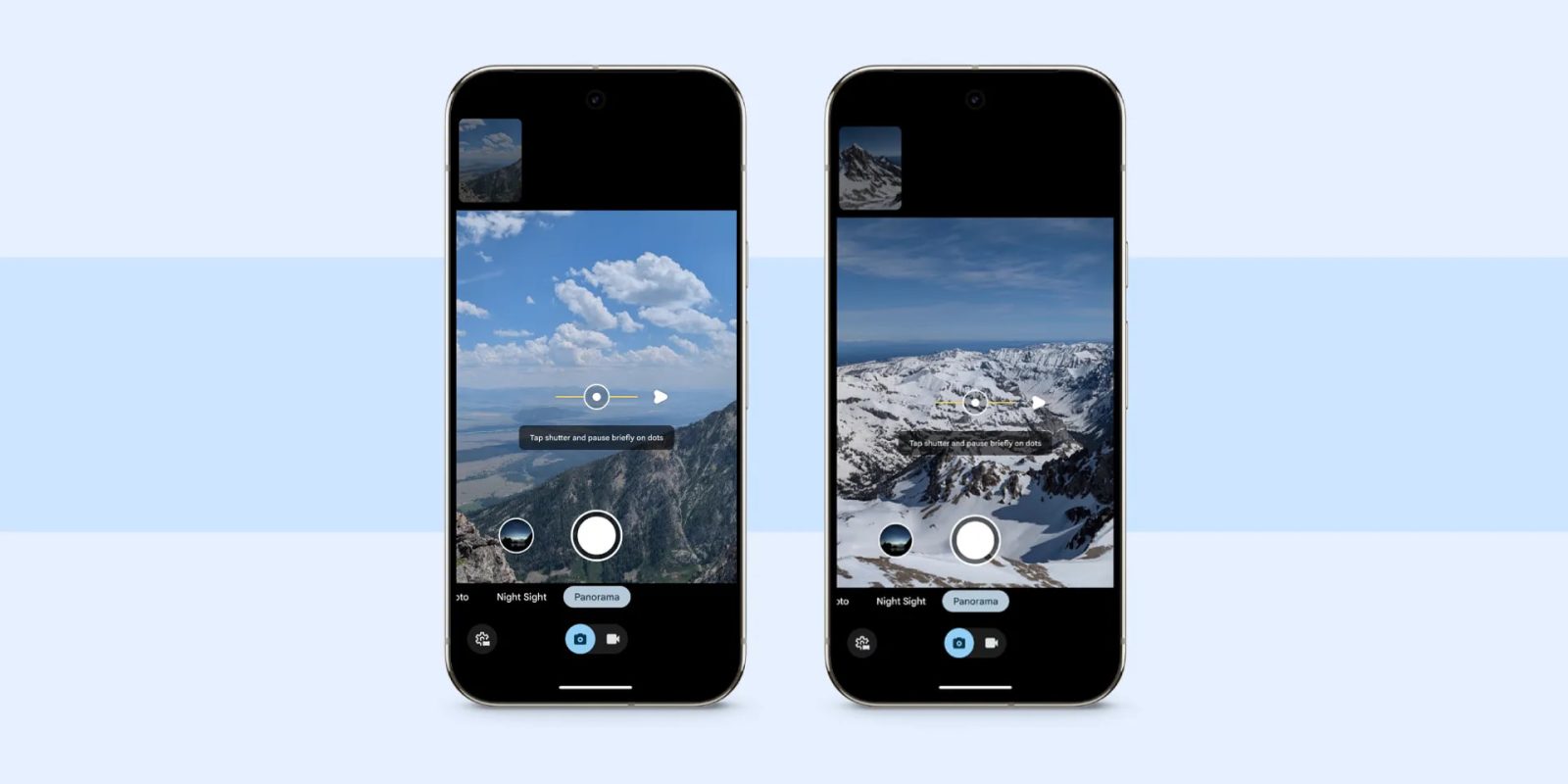
With the Pixel 9, Google introduced a new Panorama mode, and the latest Camera update brought it to the Pixel 8 series. 

It starts with an “easy-to-follow UI” that uses a series of dots and various prompts underneath to guide you. The interface also integrates a level indicator. 

This takes inspiration from Photo Sphere, which was removed from new devices starting on the Pixel 8 in 2023. As you move your device and capture, a small preview appears above the viewfinder.

Tapping the Settings gear in the bottom-left corner lets you set the capture direction to the left or right, as well as up or down if you rotate your phone to landscape orientation. 

Advertisement – scroll for more content

Pixel 7 Pro vs. Pixel 8

This new Panorama mode can be used in conjunction with Night Sight, which can be set to Off, Auto, or On. Overall, Google recommends that you “just rotate the camera as much as you can while standing in place.” By not rotating your body, this helps eliminate “perspective shift — or those jagged edges you can get when each transition doesn’t quite line up — and create a smooth stitch.”

Behind the scenes, this updated Panorama uses the “Pixel’s HDR+ pipeline and its photo pipeline to create stitched photo panoramas” instead of video, which captures less data.

Google appears to have rolled out the new Panorama mode to the Pixel 8 series with version 10.2 of Pixel Camera at the start of December. It’s not showing up on a Pixel 7 Pro running the same update today.

FTC: We use income earning auto affiliate links. More.


Source link

Massachusetts weather forecast: What to expect for Christmas 2025

0


Christmas Day in Massachusetts is expected to be breezy with isolated rain and snow showers in some parts of the state and temperatures dropping late in the day, according to the National Weather Service.

While some light snow may fall this morning into the early afternoon, forecasters expect no accumulation.

Wind speeds are expected to reach 30 to 40 mph Christmas morning before gradually decreasing in the afternoon. But they are forecast to pick up again and return to those speeds later Christmas Day, according to forecasters.

Temperatures will remain “seasonable,” the weather service said. Forecasters expected temperatures to reach the upper 30s to low 40s in Boston, Worcester, Springfield and on Cape Cod, with slightly cooler temperatures in the mid-30s in Pittsfield.

A cold front moving into the region Thursday evening will drop temperatures into the teens in many areas, and into the single digits at higher elevations.

Gusty winds will bring the wind chill “down to near or below zero overnight,” the weather service said.

Friday is expected to remain cold with high temperatures only reaching the low to mid-20s. Forecasters are keeping an eye on a storm system that could bring “plowable snow” to the region Friday night into Saturday.

The weather service remains uncertain on the path of the storm and how much snow it could bring. The greatest chances of at least three inches of snow are in southwest Connecticut, forecasters said.


Source link

Nvidia to license AI chip challenger Groq’s tech and hire its CEO

0


Nvidia has struck a non-exclusive licensing agreement with AI chip competitor Groq. As part of the deal, Nvidia will hire Groq founder Jonathan Ross, president Sunny Madra, and other employees.

CNBC reported that Nvidia is acquiring assets from Groq for $20 billion; Nvidia told TechCrunch that this is not an acquisition of the company and did not comment on the scope of the deal. But if CNBC’s numbers are accurate, this purchase is expected to be Nvidia’s largest ever, and with Groq on its side, Nvidia is poised to become even more dominant in chip manufacturing.

As tech companies compete to grow their AI capabilities, they need computing power, and Nvidia’s GPUs have emerged as the industry standard. But Groq has been working on a different type of chip called an LPU (language processing unit), which it has claimed can run LLMs at 10 times faster and using one-tenth the energy. Groq’s CEO Jonathan Ross is known for this sort of innovation — when he worked for Google, he helped invent the TPU (tensor processing unit), a custom AI accelerator chip.

In September, Groq raised $750 million at a $6.9 billion valuation. Its growth has been quick and significant — the company said that it powers the AI apps of more than 2 million developers, up from about 356,000 last year.

Updated, 12/24/25 at 5:40 p.m. ET, with clarification from Nvidia about the nature of the deal.


Source link

How to watch, full streaming schedule and more

0


Amazon Prime Video is the exclusive home for the NFL’s Thursday Night Football games, including this week’s game. On top of Amazon Prime Video, an Amazon Prime subscription includes free shipping, exclusive deals, access to the Prime Day sales events, Amazon Music, a year of free GrubHub+ and more. 

A standard Amazon Prime subscription is $15 monthly or $139 annually, but discounts are available for students and those on qualified government assistance. You can try Amazon Prime free for 30 days. You can also just subscribe directly to Prime Video and forego all the other Prime Benefits. A Prime Video subscription costs $9 monthly. 


Source link

What Gemini features you get with Google AI Pro [Dec 2025]

0


At I/O 2025, Google One AI Premium (and Gemini Advanced) became “Google AI Pro,” while a higher, more expensive tier was introduced with “Google AI Ultra.”

Updated 12/24

Free

[Updated] Gemini app

  • Fast (3 Flash): “General access”
  • Thinking (3 Flash) & Pro (3 Pro): “Basic access – daily limits may change frequently”
  • Context window: 32,000 tokens (“around 50 pages of text”)

  • Audio Overviews: Up to 20 audio overviews / day
  • Deep Research: Up to 5 reports / month using Thinking
  • Image generation & editing:
    • Nano Banana: Up to 100 images / day
    • Nano Banana Pro: Up to 3 images / day
  • Dynamic view: Up to 25 prompts / day
  • Slide generation: Up to 20 presentations / day

[New] Google Search AI Mode

Free users in the US now have access to “Thinking (3 Pro)” for “Complex reasoning and generative layouts.” There are daily usage limits, with Gemini 3 Flash now powering the “Auto” model. Similarly, those in the US have access to Create Images Pro (Nano Banana Pro).

Google AI Pro 

AI Pro is simply a rebrand that drops the explicit “Google One” connection, while being a bit snappier and shorter than “AI Premium.” In the US, it remains available for $19.99 per month.

Advertisement – scroll for more content

[Updated] Gemini app 

In the Gemini app, you get “expanded” versus “limited” (on the free tier) access to: 

  • Thinking & Pro (100 prompts / day)
  • Deep Research with 3 Pro (20 reports / day)
  • Image generation & editing:
    • Nano Banana: Up to 1,000 images / day
    • Nano Banana Pro: Up to 100 images / day
  • Dynamic view: Up to 250 prompts / day
  • Scheduled actions (10 active actions at a time)
  • Veo 3.1 Fast: 3 videos / day
  • Spreadsheet and code analysis

There’s also the 1 million token context window, which is equivalent to 1,500 pages of text or 30,000 lines of code.

Gemini in Google Workspace 

The Gemini side panel and other inline features are available in: Gmail, Google Drive, Docs, Sheets, Slides, Meet, and Chat. 

You also get access to Google Vids. This AI-powered video creation app lets you create, write, produce, edit, collaborate, and share videos. It’s catered towards more presentation-style videos in school or business contexts, but there are personal use cases. Specific capabilities include adding:

  • Stock images
  • GIFs
  • Video clips
  • Stickers
  • Music
  • Sound effects
  • Self recording
  • Screen record with narration
  • Screen record with video recording
  • Voiceover through the Vids recording studio

Google AI Mode

AI Pro subscribers get “Higher” usage limits for Gemini 3 Pro, and Deep Search on google.com/ai to “ask more sophisticated queries and get back longer, more detailed responses.” Like Gemini’s Deep Research, responses take a few minutes. Google is performing “hundreds of searches” and reasons “across disparate pieces of information” to generate a “comprehensive, fully-cited report.” Google can ask you for more details before starting the process.

You also get a “Higher” level of Nano Banana Pro image generation and editing, while there’s AI-powered calling for local business pricing.

Google Home Premium

Google Home Premium Standard was previously Nest Aware and an additional $10/month. You get:

  • Gemini Live: Will be available on the Nest Mini, Nest Hub Max, Nest Audio, and 2nd-gen Nest Hub.
  • 30 days of event-based video history
  • Intelligent alerts: Familiar faces, garage door detection, package detection, smoke & CO alarm
  • Automation creation: With Ask Home and Help me create, you can create automations using natural language prompts.
  • Saved information: You can have Ask Home remember things about your household to personalize your experience.

Google Home Premium Advanced can be purchased for $10 more as an add-on.

Google Photos

From the Create tab, you get Higher remix generations and photo-to-video generations (versus Limited for free users).

NotebookLM

The paid tier for Google’s research tool was previously called NotebookLM Plus. Like in the Gemini app, you now see a “Pro” badge next to your profile image in the top-right corner. Google AI Pro provides:

  • 5x more Audio Overviews: 20 per day (versus 3 on free)
  • Have up to 500 notebooks (vs. 100)
  • Add 300 sources per notebook (vs. 50)
  • Start 500 chat queries per day (vs. 50)
  • Sharing “Chat-only” notebook
  • Advanced chat settings: Preferred response style, like Guide, Analyst, or custom
  • Notebook analytics

2 TB of Google One storage 

This can be used for Gmail, Drive, and Photos. The standalone storage cost is $9.99 per month. 

Jules + Gemini Code Assist + Gemini CLI + Antigravity

Jules is Google’s asynchronous coding agent. AI Pro subscribers get 5x higher limits (versus free users). It’s “ideal for daily coding.” You also get higher daily model requests for Gemini Code Assist and Gemini CLI.

Google Antigravity gives you “Higher” agent requests.

Whisk Animate

This Google Labs experiment was announced in 2024 where images of a subject, scene, and style are used as prompts. The Whisk Animate feature uses Veo 3 to turn images into short videos.

Flow 

At I/O 2025, Google announced Flow as an AI filmmaking suite for video creation and editing. It offers features like: Text to video, Ingredients to video, and Frames to video.

1,000 AI Credits per month 

With this new plan, Google has introduced the concept of AI Credits that apply to Whisk and Flow. Refer to the following table:

The AI Credit costs below are per generation, not per request. Some product features will create multiple generations per request. For example, in Flow, a single request may generate 2 videos.]

AI Pro subscribers can now buy “top-up AI Credits” at the following rates. They are valid for 12 months, with this ability previously just for the AI Ultra tier.

Top-up amount (USD) AI Credits
$25 2,500
$50 5,000
$200 20,000

Google AI Ultra 

AI Ultra is also available in 150+ countries. It costs $249.99 per month in the US.

Whisk + Flow + 12,500 AI Credits per month

[Updated] Gemini app

  • Thinking & Pro: 500 prompts / day
  • Gemini Agent:
    • 200 Agent requests per day
    • 3 Agent tasks running at the same time
  • Deep Research using Pro (200 reports / day)
  • Deep Think (10 prompts / day with a 192,000 token context window)
  • Image generation & editing
    • Nano Banana Pro: Up to 1,000 images / day
  • Veo 3.1 (5 videos / day)

Google AI Mode

AI Ultra provides the “Highest” access to Gemini 3 Pro, Nano Banana Pro, and agentic capabilities.

Google Home Premium Advanced

Replacing Nest Aware Plus, you get:

  • 60 days of event-based video history
  • 10 days of 24/7 video history
  • AI descriptions provide more detailed long descriptions of camera events.
  • AI notifications provide short versions of AI descriptions within camera event notifications.
  • Home Brief an overview of what happened at home each day.
  • Ask Home video history search

Google Photos

From the Create tab, you get the Highest level of remix generations and photo-to-video generations.

Jules + Gemini Code Assist + Gemini CLI + Antigravity

Jules in Google AI Ultra gives you 20x higher limits “for intensive, multi-agent workflows at scale.” You get the “Highest” daily model requests for Gemini Code Assist and Gemini CLI, while it’s the “Highest” number of Agent requests.

[New] NotebookLM

Google AI Ultra unlocks:

  • 600/notebook (2x AI Pro)
  • 5K Chats per day (10x)
  • 200 Audio Overviews / day (10x)
  • 200 Video Overviews / day (10x)
  • 1,000 Reports / day (10x)
  • 1,000 Flashcards / day (10x)
  • 1,000 Quizzes / day (10x)
  • 200 Deep Research / day (10x)
  • Highest Limits for Data Tables, Infographics, Slides
  • Watermark removal for Infographics and Slide Decks

30 TB of Storage 

This otherwise costs $149.99 per month.

YouTube Premium 

The Individual plan costs $13.99 per month.

Project Mariner

This research prototype for browser agents lets you perform 10 tasks simultaneously. Example use cases include research, shopping, and booking travel. 

FTC: We use income earning auto affiliate links. More.


Source link

Boston nightclub shares account of events on night woman collapsed, then died

0


The Boston nightclub at which a woman collapsed early Sunday morning before dying shared their account of the events of that night on Wednesday, claiming that its staff worked “diligently and efficiently” to respond to the medical emergency.

However, the Boston Police report about the incident indicates that Icon nightclub, whose entertainment and liquor licenses have been suspended by city officials, kept operating after Anastaiya Colon collapsed and became unresponsive. It states that officers found her covered in vomit on the dance floor and struggled to keep the club’s patrons back as they tried to revive her.

Icon’s managers gave an account of what happened at the nightclub based on a review of its security video footage in an Instagram post. They claimed that CPR was administered to Colon within a minute of the club’s staff being notified that she’d collapsed, that Boston Emergency Services (Boston EMS) was contacted within two minutes of staff being notified and that Boston police arrived on scene six minutes after the club’s staff was notified.

“We hope the family finds some comfort knowing that Boston Police, Boston EMS and the Club Staff worked diligently and efficiently in responding to this unfortunate situation,” Icon’s managers wrote.

Boston Police’s account of events

The Boston Police report about the incident states that officers responded to a radio call about “an unknown issue” at the club’s Warrenton Street address shortly before 12:30 a.m. As they were driving down the street and checking in with various clubs, Colon’s friend flagged them down and informed them that Colon was on the floor inside Icon and not breathing.

Club security escorted the officers inside the nightclub, and they soon found Colon “unresponsive on the dance floor in the recovery position,” according to the report. A large crowd had gathered around her and encroached on the space in which officers attempted to aid her.

The officers began to medically evaluate Colon and contacted Boston EMS while trying to create more space, according to the report. They quickly noticed that her eyes were fixed and that her face was covered in vomit and mucus from her lungs.

As the officers began providing CPR to Colon, a staff member at the club came forward and told them she also worked as an EMT for Boston EMS, according to the report. The staff member took over the chest compressions so that the officers could work to keep the crowd back.

The officers soon requested back-up, but even with the help of additional officers, they could not create enough space for Boston EMS to properly administer aid, according to the report. Because the crowd would not comply with officers’ demands to back up, Boston police eventually ordered the club to close and all patrons to leave.

Boston EMS took Colon to Tufts Medical Center, according to the report. Her sister and friend informed police that she had a heart condition, but did not provide specifics.


Source link